TV reception troubleshooting: fix no signal, pixelation and missing channels
No signal, pixelation, missing channels or dropouts in rain and at night? Find your symptom and fix it.
Symptom by symptom fixes from the team that makes Tower Aim, with retune steps and help aiming your TV antenna or aerial.
Updated
No ads, no account.
QUICK ANSWER
The short version.
Read this, then find your symptom below.
THE SHORT ANSWER
Why is my TV reception bad?
Most TV reception problems come down to one of five things: the TV is on the wrong input or needs a retune, a cable or connector has failed, the antenna isn't pointing at the transmitter that serves your address, an amplifier or splitter is faulty, or something is getting in the way of the signal (hills, buildings, trees, weather or mobile interference). Start with the symptom you're seeing below. Most fixes take a few minutes from the couch, and you'll know when it's time to get on the roof or call an installer.
WHO WROTE THIS
Systemic Studios, the makers of Tower Aim
Systemic Studios makes Tower Aim, the app this guide uses for aiming. Roof work is dangerous: if your antenna is hard to reach, use a professional antenna installer.
FIND YOUR SYMPTOM
Find your symptom.
Start with what you see on the TV, then jump to the fix.
A "No signal" message on all channels usually means nothing is reaching the TV's tuner at all, rather than a weak signal.
1. Check the input.
Press Source or Input on the remote and choose TV, Antenna, Air or DTV, not HDMI. A "No signal" message on an HDMI input is a different problem.
2. Reseat the cables.
Push the antenna lead firmly into the wall plate and the TV. Swap the fly lead for a known-good one. It's the quickest fix on this list and it works more often than you'd think.
3. Check the amplifier power.
If you have a masthead amplifier, find its power supply (often behind a TV or in the ceiling) and make sure its light is on. A blown power supply cuts the signal to every TV in the house.
4. Try another TV or wall socket.
If a different TV works on the same socket, the problem is the first TV's settings. If no socket works, the fault is in the antenna, cable or amplifier.
5. Rule out an outage.
Check your broadcaster's reception or outage notices, or ask a neighbour. If it's a transmitter fault, waiting is the fix.
Digital TV doesn't go fuzzy like the old analogue picture did. When the signal gets too weak or too noisy, the picture breaks into blocks, freezes or the sound cuts out. Then it drops to "No signal".
Check the signal quality screen.
Most TVs show signal strength and quality in the channel or diagnostics menu. Strong strength with poor quality points to interference or reflections, not a weak signal.
Re-aim the antenna.
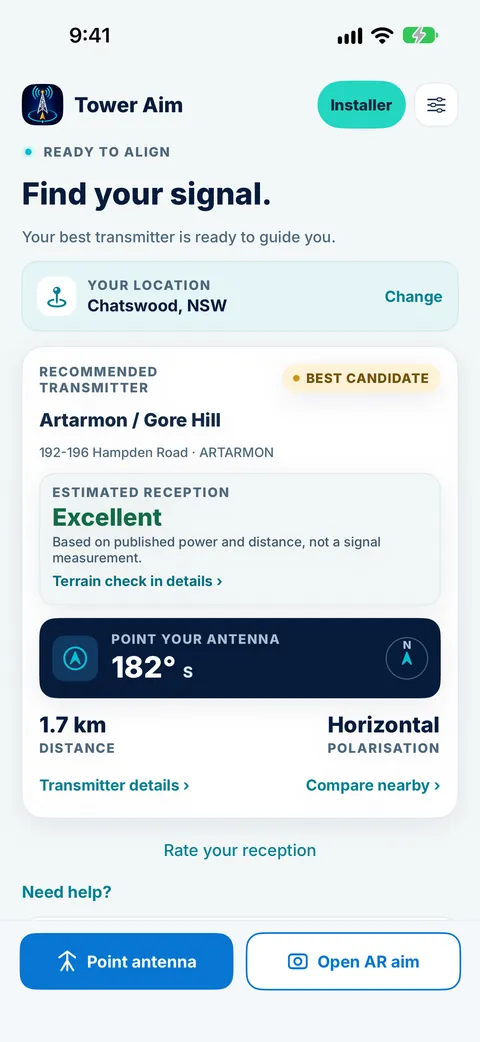
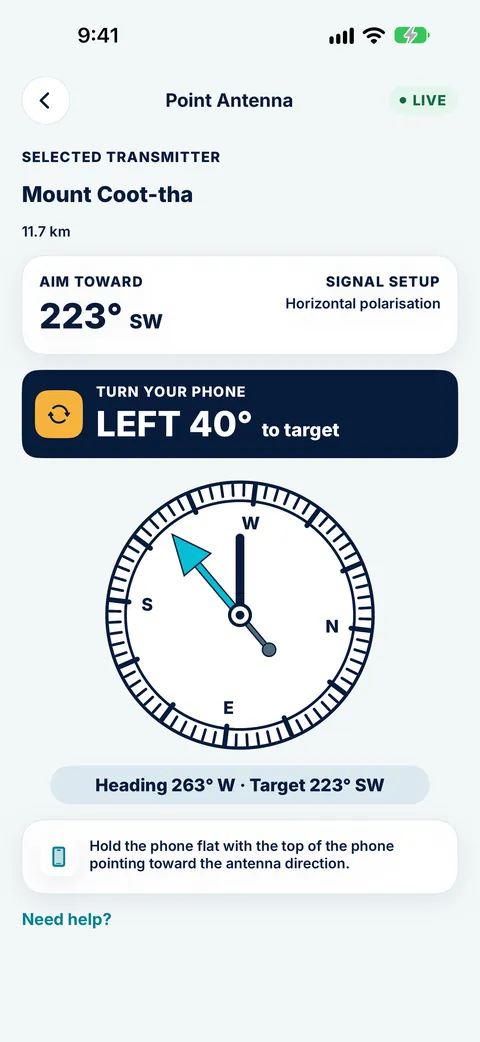
Being a few degrees off is enough to cause breakup on some channels and not others. Open Tower Aim, pick the transmitter that serves your address, and follow the live compass or AR arrow until it tells you the bearing is locked.
Match polarisation.
The antenna's elements should be horizontal or vertical to match your transmitter. Tower Aim shows the polarisation for each transmitter.
Look for blockers.
A hill, a new building or a tall tree between you and the tower can weaken the signal. Tower Aim's terrain line of sight check shows when the land is in the way, so you can try another transmitter or mount higher instead of guessing.
Check for mobile interference.
4G and 5G mobile signals can swamp a TV antenna system. A 4G/5G filter at the antenna or amplifier input often fixes breakup that started out of nowhere.
Remove extra splitters.
Every split weakens the signal. Test one TV connected straight to the antenna lead.
If some channels work and others don't, the TV is getting a signal but not every service in it.
1. Retune first.
Broadcasters sometimes change frequencies or add services. A fresh auto-tune picks them up.
2. Check you're aimed at the right transmitter.
Your area may be served by more than one tower, and each may carry different channels. The nearest tower isn't always the right one. Check mySwitch (the Australian Government's TV reception site) for your address, then use Tower Aim to line up on it.
3. Lost channels after a retune?
Your TV may have locked onto a weaker, more distant transmitter. Re-aim the antenna, then retune again. Some TVs also let you delete the duplicate channels and keep the stronger set.
4. Older TV?
Some channels now use newer broadcast formats that older TVs and set-top boxes can't decode. If only certain channels are missing on one older TV, and they work on a newer TV in the same house, the TV is the cause.
5. Check the band.
Some areas use VHF as well as UHF. An antenna built for only one band can miss the channels on the other. Tower Aim shows the antenna band advice for each transmitter.
Reception that fails only in wet weather usually means water is getting into a connector, a cable or the amplifier, or your signal is close to the limit already. Check outdoor connectors for corrosion and make sure they're sealed. Wet leaves on trees in the signal path can also weaken it.
When it's windy
If the picture breaks up in strong wind, the antenna or mast may have worked loose and is moving off target, or trees are swaying through the signal path. Re-tighten the mount, then check the aim with Tower Aim so you're back on the exact bearing.
At night or in warm, still weather
On some evenings, especially in summer, signals from distant transmitters can travel much further than normal and interfere with your local channels. It's common along parts of the Australian coast. It usually clears by morning. A well-aimed antenna with the right polarisation rejects more of that interference, so check your aim first.
After a storm
If reception never came back after a storm, the antenna has probably been knocked out of line or damaged. Re-aim it, or call an installer if anything looks bent or broken.
Your new address may be served by a different transmitter from your old one, sometimes with different polarisation. The previous owner's antenna may also be pointing at a tower that suits a different setup. Check mySwitch for your address, then use Tower Aim to see the nearby towers, the bearing to each, and whether the terrain line of sight is clear.
New TV
Run the first-time setup and choose Antenna or Air (not Cable or Satellite) as the signal source, then do a full auto-tune. If you're replacing an older TV, the new one may find extra channels the old one couldn't decode.
Apartments and units
Most buildings share one antenna system. If every apartment has the same problem, contact the building or strata manager before touching anything.
A retune, also called an auto-tune or channel scan, makes the TV search for every service it can receive right now. Do one after any change to the antenna, cabling or TV settings.
1. Press Menu, Settings or Home on the remote.
2. Find Channels, Broadcasting or Tuning. The name varies by brand and model.
3. Choose Auto-tune, Auto program, Channel scan or Channel tuning.
4. Pick Antenna, Air or Digital as the source if asked.
5. Let the scan finish without interrupting it. It can take a few minutes.
6. Check the channel list. If you have duplicates, keep the set with the better picture.
Tip: After re-aiming the antenna, always retune. The TV keeps its old channel list until you do.
The antenna, mast or bracket is bent, broken or loose and you can't reach it safely
Cabling inside the walls or roof has failed
The amplifier needs replacing, or you need a new antenna for a different band
You've re-aimed, retuned and checked every cable and the problem is still there
Never climb onto a roof in wet or windy weather. Before the visit, open Tower Aim and note which transmitter you're aiming at. It saves your installer time on the roof. Installers can also use Tower Aim Installer and our TV antenna installation checklist to confirm the tower, record the job and hand over a report.
OTHER COUNTRIES
Outside Australia: aerial and antenna guides by country
The fixes on this page work the same way wherever you watch broadcast TV. Only the transmitters and local reception sites differ. In the UK, Ireland and New Zealand it's usually called a TV aerial.
Tower Aim shows the towers around you, points you at the right one with a live compass and AR view, and tells you when you're locked on. Its terrain line of sight check explains why a signal might be weak before you climb a ladder.
Sudden problems usually follow a change: a storm knocking the antenna out of line, water in a connector, a failed amplifier power supply, a broadcaster changing frequencies (fixed by a retune), or new 4G/5G interference. Check the cables and amplifier light, retune, then check your antenna's aim.
Why is my TV pixelating all of a sudden?
Pixelation means the signal is too weak or too noisy for the TV to decode cleanly. Common causes are an antenna that has moved slightly, a damaged cable, mobile phone interference or something new blocking the signal path. Re-aim the antenna, check connectors and retune.
Why does my TV lose signal when it rains?
Usually because water is getting into a connector, cable or amplifier, or because your signal is already close to the limit and wet trees in the path weaken it further. Seal and check outdoor connections. If the antenna is old or damaged, replacing it often fixes it.
Why does my TV signal drop out at night?
In warm, still conditions, signals from distant transmitters can travel further than usual and interfere with your local channels. It usually clears by morning. A precisely aimed antenna with the correct polarisation is less affected.
Why is my TV signal strong but the quality is poor?
Strength measures how much signal arrives. Quality measures how clean it is. Strong but poor usually means interference, reflections from nearby buildings, an overloaded amplifier, or 4G/5G mobile signals getting in. A 4G/5G filter or better aim often helps.
Why do I lose channels when I retune my TV?
The TV may have picked up a weaker, more distant transmitter, or the antenna isn't aimed well enough to receive every service from your local tower. Re-aim at the transmitter that serves your address and retune again.
How do I get my TV back on when it says no signal?
Check the TV is on the antenna input, not HDMI. Reseat the antenna cable at the wall and the TV, check the amplifier power light, then run an auto-tune. If there's still no signal, the fault is likely in the antenna, cabling or amplifier.
Is there an app to help aim my TV antenna?
Yes. Tower Aim shows nearby TV towers and the bearing to each, guides you with a live compass and AR view, and confirms when you're locked on. It also checks terrain line of sight so you can see when hills are in the way.
 Systemic Studios