Start a Project

How to aim your caravan TV antenna at every stop

Find the nearest transmitter, check the hills and match the polarisation at every stop.

A practical routine for caravans, motorhomes and campervans with an antenna you turn, anywhere in Australia. Each step shows how to do it with Tower Aim, our app, and where mySwitch, the Australian Government's coverage website, helps.

Download on the App StoreGet it on Google Play

No ads, no account.

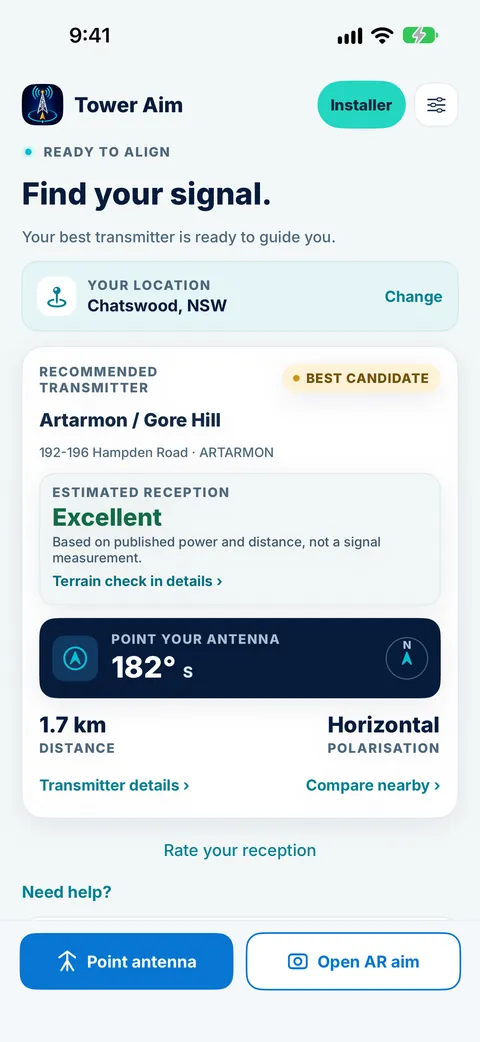
Tower Aim home screen for Chatswood, NSW, showing the recommended Artarmon / Gore Hill transmitter, estimated reception, antenna bearing and polarisation
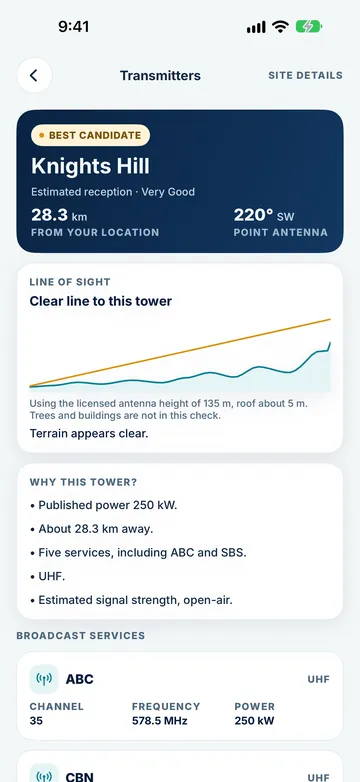
Tower Aim displaying a clear elevation profile from Wollongong to the Knights Hill transmitter
QUICK ANSWER

The short version.

Read this, then follow the steps below for the detail.

THE SHORT ANSWER

Which way should a caravan antenna point?

At each stop, point the antenna at the nearest transmitter that has a clear path to you, with the elements matching its polarisation. Raise the antenna fully, turn it to the bearing, then retune the TV. If the picture is poor, try another nearby transmitter or move the van: a hill, trees or the next van can be in the way.

WHO WROTE THIS

Systemic Studios, the makers of Tower Aim

Systemic Studios makes Tower Aim, the app this guide uses at each stop. We also point to mySwitch, the Australian Government's coverage website, where it helps. This guide is for antennas you turn, by hand or with a winder.

AT EACH STOP

Aim at every stop
in seven steps.

Step 1 happens before you leave home. The rest takes a few minutes at each stop.

1. Before you leave, install the app

Tower Aim's transmitter data is built in, and the terrain map is a one-time download the first time you open it (automatic on Wi-Fi; on mobile data it asks first), then it stays on your phone. Open it once at home on Wi-Fi and allow location access.

2. Find the nearest transmitter that serves you

When you pull up, open Tower Aim. It uses your location to recommend a transmitter based on published power and distance, not a signal measurement, from ACMA data covering every licensed digital TV transmitter in Australia: 2,598 transmitters across 582 sites, updated 28 September 2026, with estimated reception from Excellent to Poor. The recommended tower isn't always the nearest one.

3. Check the hills

Check the terrain line of sight to the transmitter before you set up. If a hill is in the way, pick another transmitter or, at a caravan park, ask for a site with a clearer view. Trees and buildings are not included, so treat it as a guide. Tower Aim Installer adds finer terrain.

4. Match the polarisation

Tower Aim shows whether each transmitter is horizontal or vertical. Set the antenna's elements to match: flat for horizontal, upright for vertical. It can change from town to town, so check it at every stop. Tower Aim also shows whether your tower is VHF, UHF or both.

5. Raise, then turn to the bearing

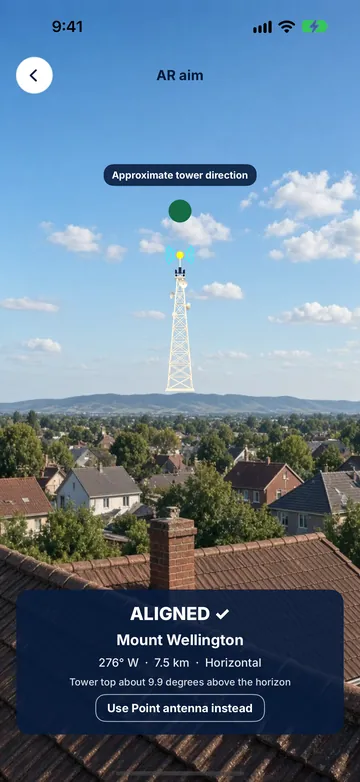
Raise the antenna to full height first, then turn it to face the bearing from Tower Aim's live compass, or use AR aiming on supported devices. Tower Aim confirms when you're aimed in the right direction; then check reception on your TV. Take the reading clear of the van and the car, because metal bodies can pull a compass.

6. Retune, then fine-tune

Retune the TV at every new stop, because channel frequencies change between areas. Then turn the antenna in small steps while watching the signal quality screen, and lock it in place.

7. See what's worked for others nearby

In a new town, Tower Aim lets you see what's worked for neighbours nearby, once enough reports are in. Many areas won't have enough reports yet. You can report how a transmitter worked for you, which helps the next traveller.

Download on the App StoreGet it on Google Play

No ads, no account.

STOP CHECKLIST

What to check at each stop.

The same checks every time, in the order that saves winding the antenna twice.

Tower Aim uses ACMA data updated 28 September 2026. Coverage varies by location, so treat every check as a guide.
CheckWhy it mattersIn Tower Aim
Saved on your phoneMany campsites have weak or no mobile coverageTransmitter data built in; one-time terrain download
Nearest transmitterEach stop is served by a different towerA recommended transmitter based on published power and distance, not a signal measurement, with estimated reception
TerrainA hill can block the path at one site and not the nextElevation profile to the tower; finer terrain with Installer
PolarisationIt can change from town to townHorizontal or vertical for each transmitter
BandThe antenna has to receive the band the tower usesWhether your tower is VHF, UHF or both
BearingA directional antenna has to face the towerLive compass arrow that confirms when you're aimed in the right direction; AR aiming on supported devices
ChannelsFrequencies differ between areas, so retuneChannels, frequencies and power for each transmitter
RepeatersTowns behind hills are often served by a local repeaterTransmitters on the map from ACMA's licensed list, with the terrain to each
Local knowledgeWhat has worked for others nearbyWhat's worked for neighbours nearby, once enough reports are in
IN THE APP

Each stop,
in Tower Aim.

Real Tower Aim screens from the App Store listing.

Find the tower

Tower Aim recommends a transmitter from your location, based on published power and distance, with the bearing and polarisation.

Check the path

Look at the elevation profile to the tower before you wind the antenna up.

Turn until on target

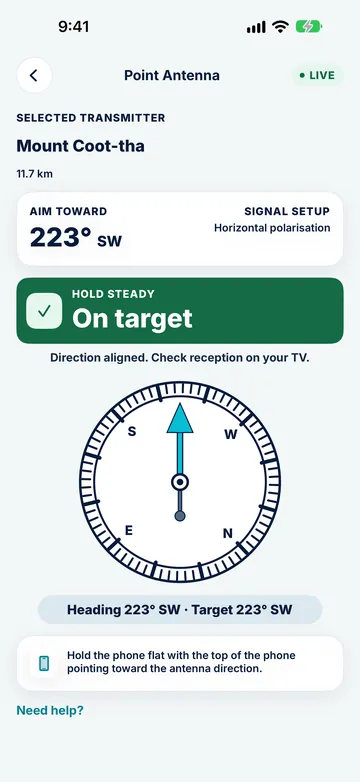
Follow the compass arrow, or AR aim on supported devices, while you turn the antenna, then check reception on your TV.

WINDING ANTENNAS

Tips for winding
antennas.

Most caravan antennas are turned from inside with a winder. These habits make that quick.

Mark the front

Put a small mark on the winder or ceiling plate showing which way the front of the antenna faces, so you can set the bearing from inside the van.

Take the bearing outside

Read the bearing away from the van, then pick a landmark in that direction to line the antenna up with. Metal walls and roofs can throw a compass off inside.

Raise it fully before turning

Most winding antennas should be fully up before you rotate them. Follow your antenna's instructions.

Turn slowly

Turn a few degrees at a time and pause, because the TV's signal readout lags behind.

Lock it, and lower it before you drive

Lock the antenna once it is aimed, and always wind it down before you move. A raised antenna can hit trees, carports and service station roofs.

Park with the tower in mind

At a caravan park or bush camp, parking a few metres over, or turning the van, can move the antenna out of the shadow of trees or other vans.

PLANNING AND ON SITE

mySwitch, Tower Aim and remote areas.

Plan with mySwitch, aim on site with Tower Aim, and know what to do where there is no terrestrial TV.

GOVERNMENT WEBSITE

mySwitch

For planning, with internet

Enter the address of your next caravan park to see the recommended transmitter, direction, polarisation and expected coverage before you arrive.

ON SITE

Tower Aim

Tower Aim: TV Antenna Finder

Uses your location rather than an address, with a live compass and AR aiming on supported devices, polarisation, band and terrain line of sight, with the data saved on your phone. Once enough reports are in, you can also see what's worked for neighbours nearby. No ads, no account.

NO TERRESTRIAL TV?

Satellite in remote areas

Viewer Access Satellite Television (VAST)

Where no transmitter covers an area, TV may only be available by satellite through VAST, the Australian Government's satellite service, which needs a dish and a receiver. Check the VAST and mySwitch websites for what applies where you are travelling.

ON THE ROADTOWER AIM FOR CARAVANS AND RVS

Aim at every stop with Tower Aim.

Tower Aim: TV Antenna Finder · TV Aerial Pointer & Compass

We make it. These are the parts that help at each stop.

Download on the App StoreGet it on Google Play

No ads, no account.

Every licensed transmitter

ACMA data updated 28 Sep 2026: 2,598 transmitters across 582 sites, with channels, frequencies and power. The recommended transmitter is based on published power and distance, not a signal measurement.

Polarisation and band

Horizontal or vertical for each transmitter, and whether your tower is VHF, UHF or both, shown before you aim.

Terrain check

A terrain line of sight from a one-time terrain download, with finer terrain in Tower Aim Installer.

Compass and AR

A live compass arrow that confirms when you're aimed in the right direction, plus AR aiming on supported devices. Then check reception on your TV.

Neighbourhood reports

See what's worked for neighbours nearby, once enough reports are in.

No ads, no account

Open it and aim. There is nothing to sign up for.

QUESTIONS

Frequently asked
questions.

More about the app: See everything Tower Aim does.

Which way should my caravan TV antenna point?

At the transmitter that serves where you are parked, with the antenna matching that transmitter's polarisation. Tower Aim uses your location to recommend a transmitter based on published power and distance, not a signal measurement, and shows the bearing and polarisation for each transmitter.

How do I find the nearest TV transmitter when I'm travelling?

Open Tower Aim at your stop. The map shows the transmitters around you, from ACMA data covering every licensed digital TV transmitter in Australia, and Tower Aim recommends one based on published power and distance, which isn't always the nearest. With internet, mySwitch can also show the recommended transmitter for a street address, such as a caravan park.

How do I get Tower Aim ready before a trip?

Open it once at home on Wi-Fi. The transmitter data is built into the app, and the terrain map is a one-time download that stays on your phone, so it's ready at each stop.

Should my caravan antenna be horizontal or vertical?

It depends on the transmitter at each stop, and it can change from town to town. Tower Aim shows horizontal or vertical for each transmitter.

Why do I lose channels when I move to a new town?

Each area is served by different transmitters on different frequencies. Re-aim the antenna and retune the TV at every new stop.

Why is reception poor even though I'm pointing at the tower?

Check the polarisation, the antenna height and the terrain to the tower. Trees, buildings and other vans can block the signal, so moving the van a little can help. A different nearby transmitter or repeater may also work better.

Does Tower Aim work with winding caravan antennas?

Yes. Tower Aim gives you the bearing and polarisation, and you turn the antenna, by hand or with the winder, until it faces the tower. Tower Aim confirms when you're aimed in the right direction; then check reception on your TV. A mark on the winder showing which way the front faces makes this quicker.

What if there is no TV transmitter in range?

In some remote areas there's no antenna TV signal, and TV is only available by satellite through the Australian Government's VAST service. Check the VAST and mySwitch websites to see what applies where you are travelling.

Does Tower Aim measure signal strength?

No. Your phone cannot measure TV signal. Tower Aim recommends a transmitter based on published power and distance, and shows "Estimated reception" as Excellent, Very Good, Good, Marginal or Poor. It is an estimate, not a signal measurement, so always check reception on your TV. Installers can record readings from their own test equipment with Tower Aim Installer.

Does Tower Aim have ads or need an account?

No. Tower Aim has no ads and no account. Tower Aim Installer is an optional subscription for professionals. See the store listing for details.

How to get a good TV signal in a caravan?

Park with a clear view toward the nearest transmitter if you can, find that transmitter's direction before you raise the antenna, then rotate slowly and rescan. Tower Aim finds nearby towers wherever you've parked and points you at them, and its terrain line of sight check tells you if a ridge is likely to block the signal, so you can move before you set up.

Where to point a TV antenna in Australia?

Point it straight at the transmitter that serves your address, not just the tallest tower you can see. Look up your local transmitter on the government mySwitch site, then use a TV antenna finder app like Tower Aim to turn that into a live compass bearing, so you know exactly which way to face the antenna before you climb the roof. Match the polarisation too: if your neighbours' antenna elements run horizontally, yours usually should as well.

Is there an app for finding antenna signal?

Yes. Tower Aim shows the towers near you, the direction to each, and an arrow that tells you when you're lined up, so you can aim with confidence instead of guessing. It also flags when hills are in the way, using terrain line of sight. Get it on the App Store or Google Play.

Which side of the antenna is the front?

On a typical Yagi (long, fishbone-style) TV antenna, the front is the end with the shortest elements. That end points at the transmitter. The longer reflector elements at the back sit behind the cable connection. Point the short end at the tower and you're aimed the right way.

Why is my TV not picking up channels?

The most common causes are an antenna pointing at the wrong transmitter, a loose or water-damaged cable or connector, a failed masthead amplifier or splitter, or a TV that needs a fresh channel scan after a retune. Check the cable and wall plate first, re-aim the antenna at your local transmitter, then run an auto-tune on the TV.

Download on the App StoreGet it on Google Play

No ads, no account.