 Systemic Studios
Systemic Studios, the makers of Tower Aim
Tower Aim is our app. This guide explains what to look for in any TV antenna app, compares the options fairly, and ends with our verdict, which recommends Tower Aim.
Start with the data: every licensed TV transmitter in Australia, and the hills in between.
A TV antenna app is only as good as the broadcast data and terrain behind it. This guide sets out what to check, compares the apps and tools Australians use, and explains why we built Tower Aim around nationwide ACMA data and a terrain check saved on your phone.


No ads, no account.
Here's how we compared the options, checked 8 Oct 2026. Weigh our verdict knowing that.
Tower Aim is our app. This guide explains what to look for in any TV antenna app, compares the options fairly, and ends with our verdict, which recommends Tower Aim.
An app can only point you at a tower it knows about, and it can only warn you about a hill if it has terrain data. Check these two first.
No ads, no account.
Look for the data source, the date and the coverage. Tower Aim has nationwide ACMA data: every licensed digital TV transmitter in Australia, 2,598 transmitters across 582 sites, updated 28 September 2026.
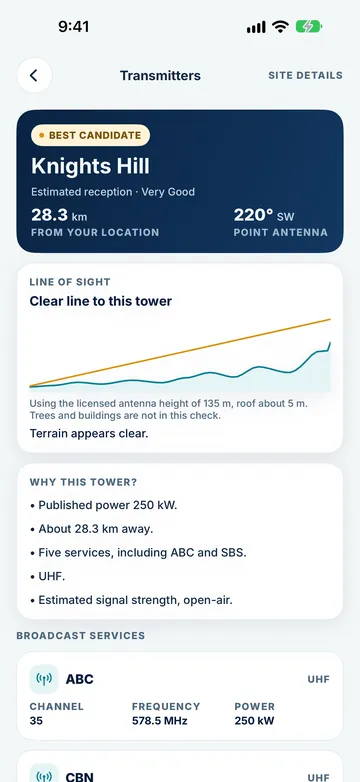
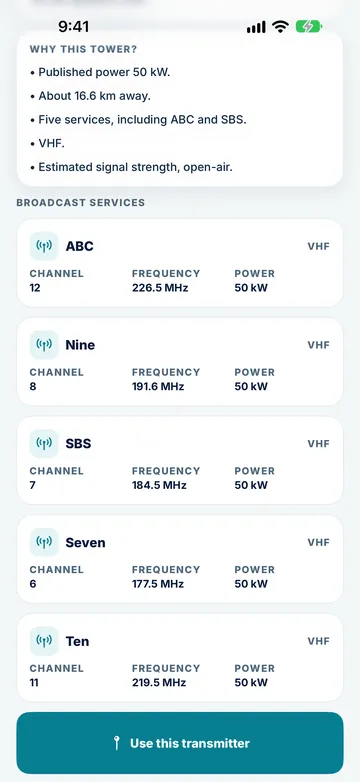
Tower Aim lists the broadcast services at each site with channels, frequencies and transmitter power, so you know you are aiming at the services you want.
See whether the tower is horizontal or vertical before you buy or climb, so the aerial is mounted the right way.
Look for a check of hills between you and the tower. Tower Aim shows the elevation profile from a one-time terrain download that stays on your phone. Trees and buildings are not included, so treat it as a guide.
The transmitter data is built in and the terrain map is a one-time download that stays on your phone, ready to check the path in the bush, on a new estate or at a caravan park.
Tower Aim Installer adds a more detailed terrain map. It is a download after you subscribe, so Wi-Fi is recommended.
Once the data and terrain are right, these decide how easy the job is.
Coverage is patchy on rooftops, at campsites and in regional areas. Check whether the app needs the internet. Tower Aim's transmitter data is built in, and its terrain map is a one-time download that stays on your phone.
A live compass arrow is the basic tool. Tower Aim adds a locked target bearing, AR aim on phones that support it, and a clear on-target confirmation.
Phones cannot measure TV signal, so any rating is an estimate. Tower Aim rates expected reception from Excellent to Poor, labelled as an estimate, with Need help? steps and optional anonymous neighbourhood reports.
Check whether there are ads or in-app purchases, and whether you need an account. Tower Aim is a one-off purchase, with no ads and no account.
For professionals: Tower Aim Installer keeps jobs by status, before and after readings from your own test equipment, photos, notes and dictation, and branded PDF reports. It is an optional subscription.
Tower Aim runs on iPhone (iOS 17 or later) and Android (8.0 or later). It is not designed for iPad.
Data and terrain rows come first because they matter most. We only list features Tower Aim has.
| Feature | Tower Aim | mySwitch | A paid iPhone app | An older paid iPhone app | An app with ads (Android and iPhone) | An Android app with ads |
|---|---|---|---|---|---|---|
| BROADCAST DATA AND TERRAIN | ||||||
| Australian transmitter data | ACMA, every licensed transmitter: 2,598 across 582 sites, updated 28 Sep 2026 | - | ACMA, updated as of 1 Jan 2024 | - | ACMA | - |
| Channels, frequencies, power | Yes | Channel frequencies | Yes | Power | - | Yes |
| Polarisation | Yes | Yes | Yes | - | - | Yes |
| Terrain line of sight | Yes, from a one-time terrain download; finer terrain with Installer | Terrain profile, online | - | - | - | Elevation chart, online |
| Saved on your phone | Yes | No, website | Yes | - | - | No, uses internet |
| AIMING, ADS AND TOOLS | ||||||
| Type | iPhone and Android app | Website | iPhone and iPad app | iPhone and iPad app | Android and iPhone app | Android app |
| Ads and account | No ads, no account | - | - | - | Contains ads, in-app purchases | Contains ads, in-app purchases |
| Live compass aiming | Yes | Direction given | Yes | Yes, with audio tone | Bearing shown | Yes |
| AR aiming | Yes, on supported phones | No | - | - | - | - |
| Reception estimate | Excellent to Poor (estimate) | Predicted coverage | Theoretical estimate | - | - | - |
| Neighbourhood reception reports | Yes, optional | - | - | - | - | - |
| Job records, photos, PDF reports | Yes, with Installer subscription | - | - | - | - | - |
Checked 8 October 2026 against each app's App Store (Australia) or Google Play listing and the mySwitch and ACMA websites. "-" means the store listing or website doesn't say, not that the app can't do it. "Older" means the app's App Store listing shows its last update in May 2022. "With ads" means the app's Google Play listing shows "Contains ads". Features change, so check the store listing before you buy.
Short notes from each public listing, checked 8 Oct 2026. No scores or star ratings.
Government website
Good for: A quick check of a street address: the recommended transmitter, direction, polarisation, channel frequencies, expected coverage, the antenna type and height to consider, and a terrain profile.
Not stated on its listing: The data date. It is a website, so there is no live compass on the roof.
iPhone and iPad
Good for: Compass-arrow aiming without an internet connection, polarisation and transmitter details, and a theoretical signal estimate. It also works on iPad. Its stated Australian data is as of 1 January 2024.
Not stated on its listing: AR aim, a terrain check (its estimate assumes a clear path with no obstructions), installer tools.
iPhone and iPad. App Store listing last updated May 2022
Good for: A compass pointer with an audio tone, and address or postcode search.
Not stated on its listing: Use without internet, the data date, polarisation, a terrain check, AR aim, installer tools.
Google Play shows ads and in-app purchases
Good for: A quick bearing to nearby towers.
Not stated on its listing: For Australia: use without internet, the data date, polarisation, a terrain check, AR aim, installer tools.
Android. Ads and in-app purchases. The listing says it uses GPS and internet
Good for: An Android look-up with channel, frequency, power and polarisation, plus an elevation chart (online).
Not stated on its listing: The data date, AR aim, installer tools.
Tower Aim: TV Antenna Finder · TV Aerial Pointer & Compass
We make it, so weigh this accordingly. Against the criteria above, these are our reasons, data and terrain first.
No ads, no account.
Nationwide ACMA data dated 28 Sep 2026, covering every licensed digital TV transmitter, with channels, frequencies, power and polarisation.
A terrain line of sight from a one-time terrain download, with finer terrain in Tower Aim Installer. None of the other app listings we checked states a terrain check saved on the phone.
Live compass and AR aim, with a locked bearing and an on-target confirmation.
Reception is shown as an estimate, never a measurement. One-off purchase, no ads, no account.
Tower Aim Installer adds jobs, readings from your own meter, photos, dictation and branded PDF reports.
Use mySwitch. Many people check mySwitch first, then aim with Tower Aim on the roof.
The paid iPhone app supports iPad.
The apps with ads give you a basic bearing.
From the ground to on target, before you touch the aerial.
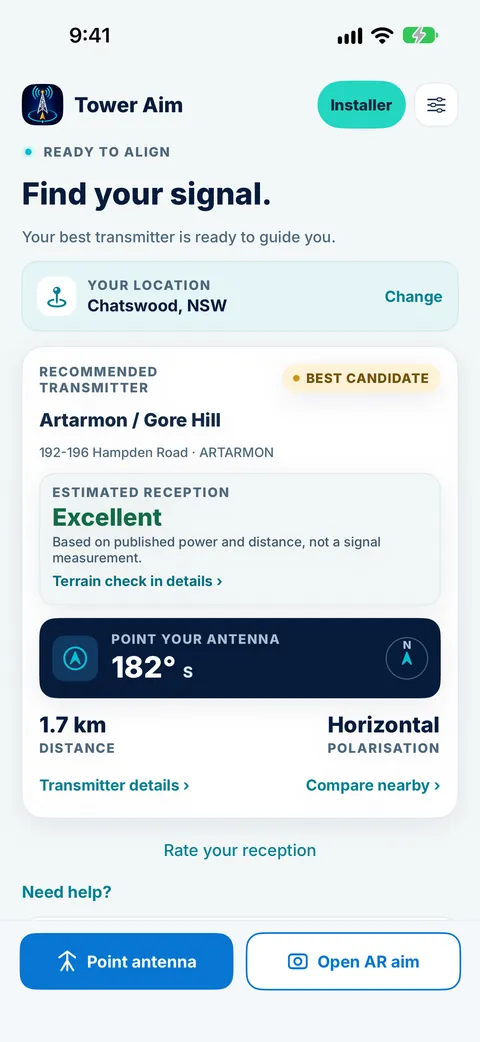
Open Tower Aim outside. It recommends nearby antenna TV transmitters by distance and published power.
See the bearing, polarisation, channels and the terrain profile to the tower.
Follow the compass arrow or AR aim while you turn the aerial, then fine-tune and rescan your TV.
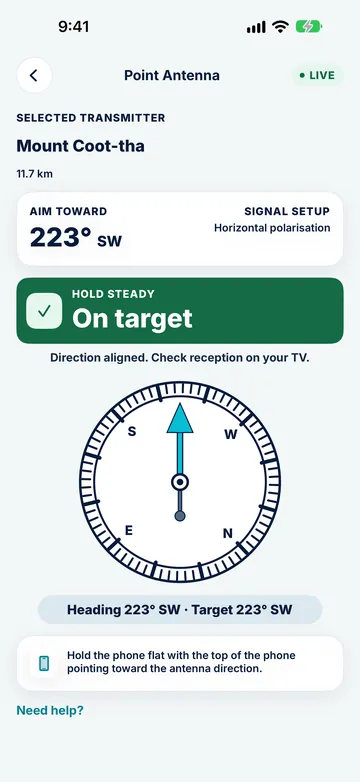
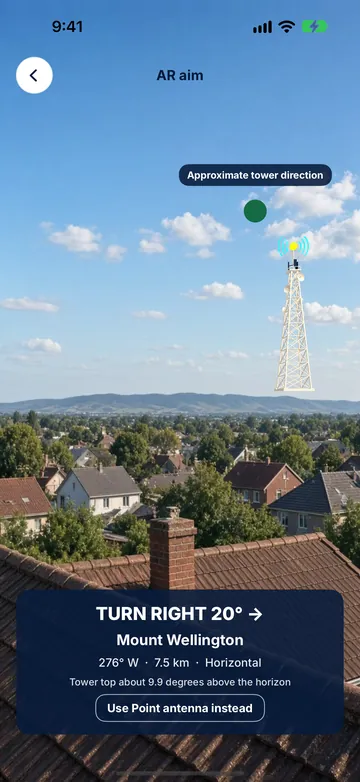
From the backyard to the whole job.
No ads, no account.
Check the tower, bearing and polarisation before you get the ladder out. If your aerial is hard to reach, use a professional installer. Roof work is dangerous.
Find nearby TV transmitters wherever the road takes you, and check which tower to aim at each stop.
Confirm the tower on site, then add Tower Aim Installer, an optional subscription that renews automatically until you cancel in your store settings; you keep it to the end of the paid period.
Still deciding? See everything Tower Aim does. Having reception problems? Here's how to troubleshoot TV reception problems.
No ads, no account.
At the transmitter that serves your area, with the aerial matching that transmitter's polarisation (horizontal or vertical). Tower Aim recommends nearby transmitters and shows the bearing and polarisation for each one. In most areas the main transmitter for your region is the one to aim at, but some areas are served by a nearby repeater instead, so check before you climb.
From the ACMA register of licensed broadcast transmitters. Tower Aim has every licensed digital TV transmitter in Australia built in: 2,598 transmitters across 582 sites, updated 28 September 2026.
No. Your phone cannot measure TV signal. Tower Aim gives an estimated reception rating from Excellent to Poor. Installers can record before and after readings from their own test equipment with Tower Aim Installer.
The transmitter data is built into the app, and the terrain map is a one-time download that stays on your phone. Open the app once on Wi-Fi before you head up.
No. Tower Aim is a one-off purchase on the App Store and Google Play, with no ads and no account. Tower Aim Installer is an optional subscription for professionals. See the store listing for details.
iPhone with iOS 17 or later, and Android 8.0 or later. AR aim works on phones that support it. Everything else works with the compass.
mySwitch is a government website that gives coverage predictions and setup advice for a street address. Tower Aim is a phone app you take onto the roof or to the campsite: it guides your aim with a live compass or AR and shows the terrain profile to the tower.
No. We make Tower Aim. We compared published features only, from each app's store listing on 8 October 2026, and we show "-" where the store listing or website doesn't say, rather than guess.
Outdoor UHF and VHF TV aerials, on a roof, a mast or a caravan.
Yes. Tower Aim shows the towers near you, the direction to each, and an arrow that tells you when you're lined up, so you can aim with confidence instead of guessing. It also flags when hills are in the way, using terrain line of sight. Get it on the App Store or Google Play.
The most common causes are an antenna pointing at the wrong transmitter, a loose or water-damaged cable or connector, a failed masthead amplifier or splitter, or a TV that needs a fresh channel scan after a retune. Check the cable and wall plate first, re-aim the antenna at your local transmitter, then run an auto-tune on the TV.
On a typical Yagi (long, fishbone-style) TV antenna, the front is the end with the shortest elements. That end points at the transmitter. The longer reflector elements at the back sit behind the cable connection. Point the short end at the tower and you're aimed the right way.
Park with a clear view toward the nearest transmitter if you can, find that transmitter's direction before you raise the antenna, then rotate slowly and rescan. Tower Aim finds nearby towers wherever you've parked and points you at them, and its terrain line of sight check tells you if a ridge is likely to block the signal, so you can move before you set up.