Start a Project

Which way to point your TV antenna in Australia

Point it at the transmitter that serves you, matched to its polarisation, along a path clear of hills.

Six practical steps, from finding your transmitter to the final fine-tune. Each one shows how to do it with Tower Aim, our app, and where mySwitch, the Australian Government's coverage website, can help.

Download on the App StoreGet it on Google Play

No ads, no account.

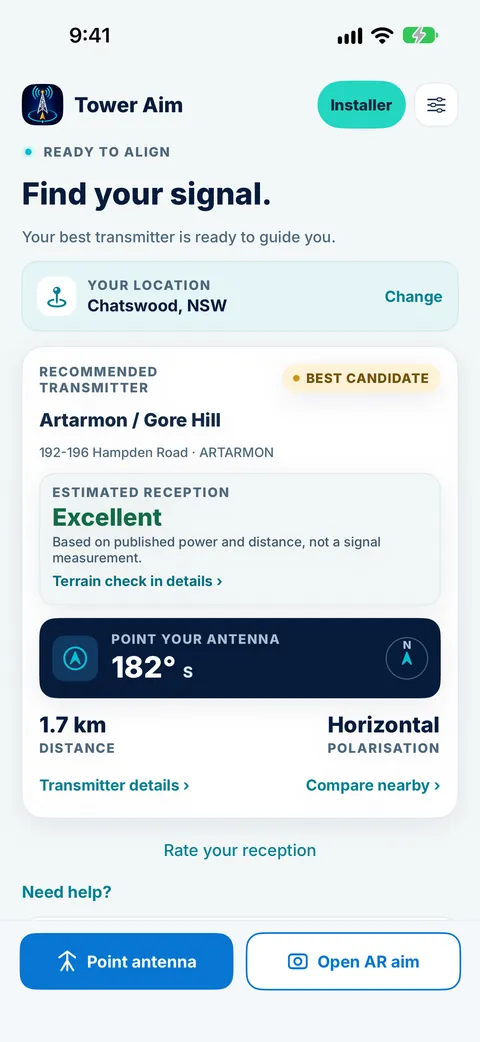
Tower Aim home screen for Chatswood, NSW, showing the recommended Artarmon / Gore Hill transmitter, estimated reception, antenna bearing and polarisation
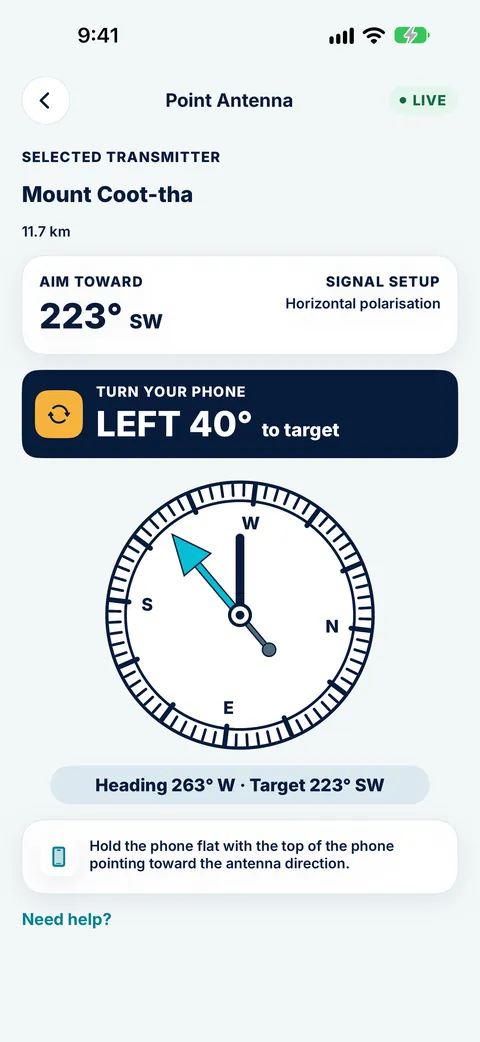
Tower Aim compass telling you to turn the phone 40° left toward the Mount Coot-tha transmitter from Chermside
QUICK ANSWER

The short version.

Read this, then follow the steps below for the detail.

THE SHORT ANSWER

Which way should my antenna point?

Point the antenna at the TV transmitter that serves your area, with its elements matching that transmitter's polarisation: flat for horizontal, upright for vertical. Check that no hill blocks the path, then fine-tune and retune your TV. Most homes aim at their region's main transmitter, but some areas are served by a nearby repeater instead.

WHO WROTE THIS

Systemic Studios, the makers of Tower Aim

Systemic Studios makes Tower Aim, the app this guide uses for each step. We also point to mySwitch, the Australian Government's coverage website, where it helps. Roof work is dangerous: if your antenna is hard to reach, use a professional antenna installer.

SIX STEPS

How to aim a TV antenna,
step by step.

Do steps 1 to 3 on the ground, before you get the ladder out.

1. Find your transmitter

Your antenna should face the transmitter that serves your area, which is not always the closest one. Tower Aim recommends a transmitter based on published power and distance, not a signal measurement, from ACMA data covering every licensed digital TV transmitter in Australia: 2,598 transmitters across 582 sites, updated 28 September 2026. It rates estimated reception as Excellent, Very Good, Good, Marginal or Poor. mySwitch gives the recommended transmitter for a street address.

2. Match the polarisation

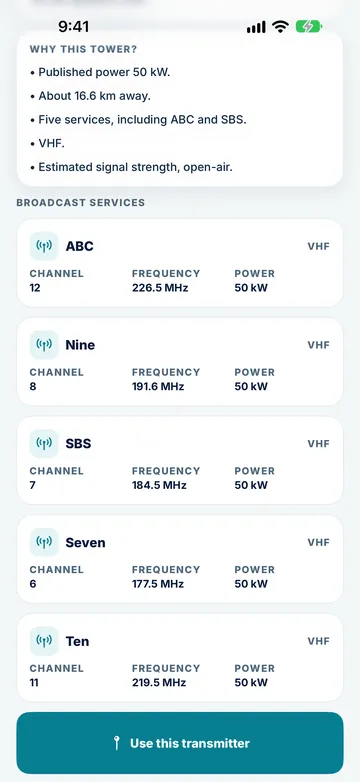
Transmitters send either horizontally or vertically polarised signals, and the antenna has to match. Horizontal means the elements lie flat; vertical means they stand upright. Tower Aim shows the polarisation for each transmitter, with its channels, frequencies and power, and whether your tower is VHF, UHF or both. Get this wrong and you can lose the picture even when the direction is right.

3. Check the terrain line of sight

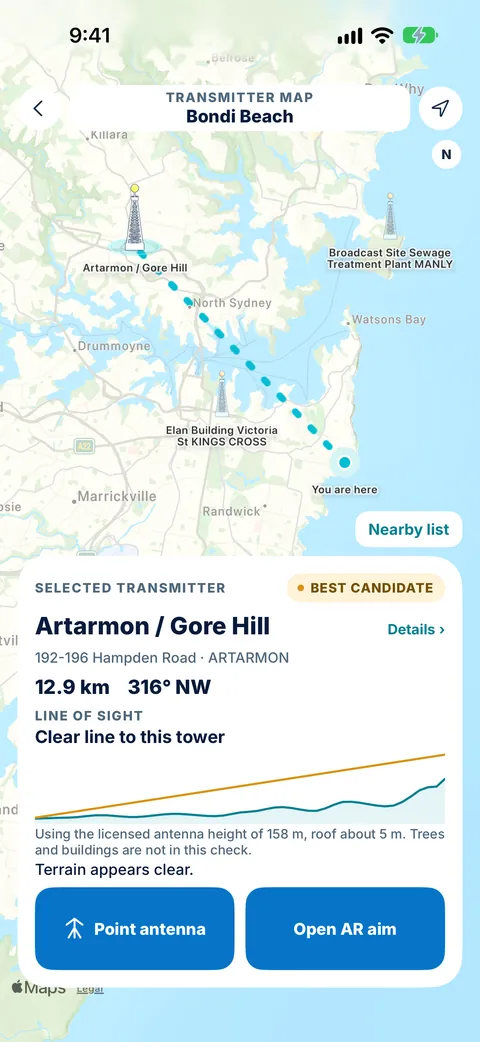
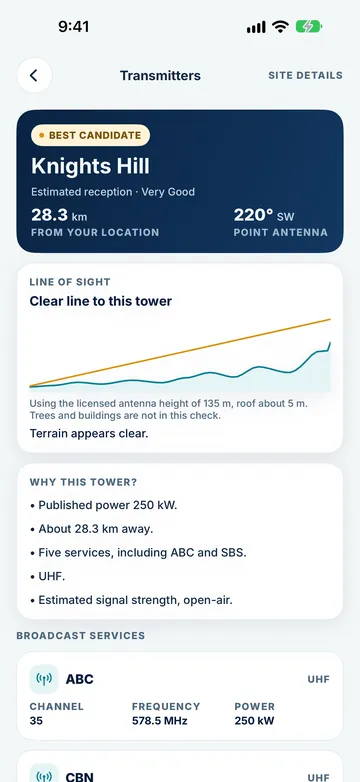
A hill between you and the tower can block the signal. Tower Aim shows the elevation profile along the path, which works from a one-time terrain download, and Tower Aim Installer adds finer terrain. Trees and buildings are not included, so treat it as a guide. If the path is blocked, a different transmitter may serve you better.

4. Aim with a compass

Stand at the antenna, or directly below it, and face the bearing to the tower. Tower Aim's live compass arrow shows which way to turn and confirms when you're aimed in the right direction. With AR aiming on supported devices, the camera view shows "Direction aligned" once you're lined up. Then check reception on your TV. Keep the phone clear of metal such as the mast, gutters or the antenna itself.

5. Fine-tune and retune

Loosen the mount just enough to turn the antenna, then move it in small steps while someone watches the signal quality screen on the TV. Tighten it, then retune the TV. A manual tune using the channel frequencies for your area, from mySwitch or Tower Aim, can pick up services an automatic scan misses.

6. Know when to aim at a repeater

Some areas, often in valleys or behind hills, are served by a smaller local repeater rather than the main transmitter. mySwitch shows the recommended transmitter for your street address, and Tower Aim's recommendation, from ACMA's licensed TV transmitters, isn't always the nearest or the biggest tower. If most antennas in your street face a different way to yours, that is a strong hint. Once enough reports are in, Tower Aim also lets you see what's worked for neighbours nearby.

Download on the App StoreGet it on Google Play

No ads, no account.

WHERE TO CHECK EACH STEP

Each step, in Tower Aim and on mySwitch.

Use whichever suits the job. Many people check mySwitch first, then aim with Tower Aim on the roof.

mySwitch details are from the ACMA and mySwitch websites, checked 8 October 2026. mySwitch is an Australian Government website.
StepWhat to checkIn Tower AimOn mySwitch
1. Find your transmitterWhich transmitter serves youA recommended transmitter based on published power and distance, not a signal measurement, with estimated reception; ACMA data updated 28 Sep 2026The recommended transmitter for a street address
2. PolarisationHorizontal or verticalShown for each transmitter, with channels, frequencies, power and whether it is VHF, UHF or bothShown for the recommended transmitter
3. TerrainHills between you and the towerElevation profile from a one-time terrain download; finer terrain with InstallerTerrain profile, online
4. AimThe bearing to the towerLive compass arrow that confirms when you're aimed in the right direction; AR aiming on supported devicesDirection given; no live compass, as it is a website
5. Fine-tune and retuneSignal quality on the TV, then a retuneChannels and frequencies for a manual tuneChannel frequencies for your address
6. RepeatersWhether a local repeater serves you betterTransmitters on the map from ACMA's licensed list, with the terrain to each; what's worked for neighbours nearby, once enough reports are inThe recommended transmitter for your address, and any known reception issues
On the roofWhat's saved on your phoneTransmitter data built in; one-time terrain downloadNothing, it is a website
IN THE APP

See each step
in Tower Aim.

Real Tower Aim screens from the App Store listing.

Find and check

See nearby transmitters on the map, then their channels, frequencies, power and polarisation.

Check the path

Look at the elevation profile to the tower before you climb.

Turn until on target

Follow the compass arrow, or AR aim on supported devices, while you turn the antenna, then check reception on your TV.

ON THE ROOF

Tips that save
a second climb.

Small habits that make the job quicker and safer.

Safety first

Only work on a roof if you can do it safely, never alone and never in wind or rain. If the antenna is high or hard to reach, use a professional antenna installer.

Check everything on the ground

Look up the transmitter, bearing, polarisation and terrain in Tower Aim before you climb, so the time on the roof is just aiming.

Calibrate the compass

If the arrow seems off, move the phone in a figure-eight to calibrate it, and keep it away from metal and magnets, including magnetic phone cases.

Look at the neighbours

Antennas nearby usually point at the same tower. If yours faces a different way, find out why before you change it.

Small moves, then wait

TV signal readouts lag a little. Turn a few degrees at a time and pause before you judge the picture.

Tighten and retune every TV

Once the picture is solid on all your channels, tighten the mount firmly and retune each TV and set-top box in the house.

TWO TOOLS

mySwitch and Tower Aim together.

mySwitch is the government reference for an address. Tower Aim is the tool you take up the ladder.

GOVERNMENT WEBSITE

mySwitch

From the Australian Government

Enter a street address to see the recommended transmitter, the direction, polarisation, expected coverage, channel frequencies and any known reception issues, plus setup advice and a terrain profile. Handy before you buy an antenna or book an installer.

ON THE ROOF

Tower Aim

Tower Aim: TV Antenna Finder

A live compass arrow and AR aiming on supported devices, the polarisation, band (VHF, UHF or both), channels, frequencies and power for each transmitter, and a terrain line of sight, all working from a one-time terrain download. Once enough reports are in, you can also see what's worked for neighbours nearby. No ads, no account.

THE TOOL FOR EACH STEPTOWER AIM FOR HOME ANTENNAS

Do every step with Tower Aim.

Tower Aim: TV Antenna Finder · TV Aerial Pointer & Compass

We make it. These are the parts that match the steps above.

Download on the App StoreGet it on Google Play

No ads, no account.

Every licensed transmitter

ACMA data updated 28 Sep 2026: 2,598 transmitters across 582 sites, with channels, frequencies and power. The recommended transmitter is based on published power and distance, not a signal measurement.

Polarisation and band

Horizontal or vertical for each transmitter, and whether your tower is VHF, UHF or both, shown before you aim.

Terrain check

A terrain line of sight from a one-time terrain download, with finer terrain in Tower Aim Installer.

Compass and AR

A live compass arrow that confirms when you're aimed in the right direction, plus AR aiming on supported devices. Then check reception on your TV.

Neighbourhood reports

See what's worked for neighbours nearby, once enough reports are in.

No ads, no account

Open it and aim. There is nothing to sign up for.

QUESTIONS

Frequently asked
questions.

More about the app: See everything Tower Aim does.

Which way should my TV antenna point in Australia?

At the transmitter that serves your area, with the elements matching that transmitter's polarisation. Tower Aim recommends a transmitter based on published power and distance, not a signal measurement, and shows the bearing and polarisation for each transmitter. mySwitch shows the recommended transmitter for a street address. In most areas that is the main transmitter for your region, but some areas are served by a nearby repeater instead.

How do I know if my antenna should be horizontal or vertical?

Match the transmitter you are aiming at. Tower Aim shows horizontal or vertical for each transmitter, and mySwitch shows it for the recommended transmitter at your address. On a horizontal antenna the elements lie flat; on a vertical one they stand upright.

Should I point my antenna at the closest transmitter?

Not always. A larger transmitter further away, or one with a clear path over the hills, can serve you better than a small one nearby. Tower Aim recommends a transmitter based on published power and distance, so its pick isn't always the nearest, and lets you check the terrain to each one.

What is a TV repeater?

A smaller transmitter that rebroadcasts the main services into an area the main transmitter does not reach well, such as a valley or a town behind a range. If you are in a repeater's area, point at the repeater and match its polarisation, which can differ from the main transmitter's.

Can I use my phone to aim a TV antenna?

Yes, for direction. Tower Aim uses your location and your phone's compass to show the bearing to the tower and confirm when you're aimed in the right direction, with AR aiming on supported devices. A phone cannot measure TV signal, so check reception on your TV, using its signal quality screen or a meter, for the final fine-tune.

How do I point a TV antenna without a compass?

Look at which way neighbouring antennas point, sight the tower if you can see it, or use a landmark that lines up with the tower on a map. A phone compass is quicker and more precise.

Do I need to retune my TV after moving the antenna?

Yes. Retune each TV or set-top box after aiming. If channels are missing, try a manual tune using the channel frequencies for your area from mySwitch or Tower Aim.

Why is my reception still poor when the antenna points at the tower?

Check the polarisation, the terrain between you and the tower, and the cables and connections. Trees and buildings can also block the path. If the main transmitter is blocked, a nearby repeater may be a better target. Once enough reports are in, Tower Aim lets you see what's worked for neighbours nearby. If you are unsure, ask a professional antenna installer.

What does Tower Aim keep on my phone?

The transmitter data is built into the app, and the terrain map is a one-time download that stays on your phone. Open the app once on Wi-Fi before you head up.

Does Tower Aim measure signal strength?

No. Your phone cannot measure TV signal. Tower Aim recommends a transmitter based on published power and distance, and shows "Estimated reception" as Excellent, Very Good, Good, Marginal or Poor. It is an estimate, not a signal measurement, so always check reception on your TV. Installers can record readings from their own test equipment with Tower Aim Installer.

Which side of the antenna is the front?

On a typical Yagi (long, fishbone-style) TV antenna, the front is the end with the shortest elements. That end points at the transmitter. The longer reflector elements at the back sit behind the cable connection. Point the short end at the tower and you're aimed the right way.

Is there an app for finding antenna signal?

Yes. Tower Aim shows the towers near you, the direction to each, and an arrow that tells you when you're lined up, so you can aim with confidence instead of guessing. It also flags when hills are in the way, using terrain line of sight. Get it on the App Store or Google Play.

Why is my TV not picking up channels?

The most common causes are an antenna pointing at the wrong transmitter, a loose or water-damaged cable or connector, a failed masthead amplifier or splitter, or a TV that needs a fresh channel scan after a retune. Check the cable and wall plate first, re-aim the antenna at your local transmitter, then run an auto-tune on the TV.

How to get a good TV signal in a caravan?

Park with a clear view toward the nearest transmitter if you can, find that transmitter's direction before you raise the antenna, then rotate slowly and rescan. Tower Aim finds nearby towers wherever you've parked and points you at them, and its terrain line of sight check tells you if a ridge is likely to block the signal, so you can move before you set up.

Download on the App StoreGet it on Google Play

No ads, no account.