Start a Project

How to aim your RV TV antenna at every campsite

Find the station that serves you, check the terrain and line up the antenna at every campsite.

A practical routine for motorhomes, travel trailers and fifth wheels with an antenna you turn. Each step shows how to do it with Tower Aim, our app, and where the FCC DTV Reception Maps, the government website, can help.

Download on the App StoreGet it on Google Play

Made by Systemic Studios.

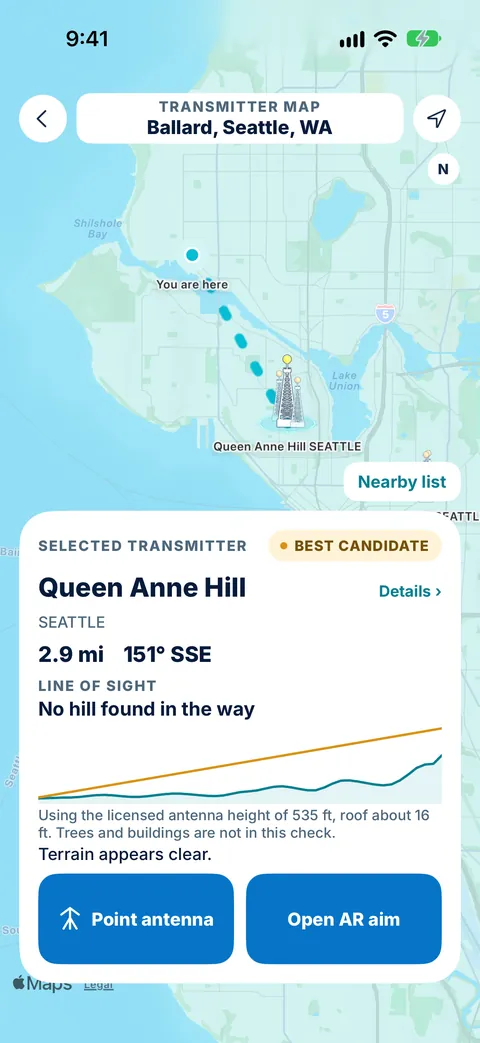
Tower Aim map in Ballard, Seattle, showing the Queen Anne Hill tower 2.9 mi away at 151° SSE, with a terrain line of sight showing no hill in the way
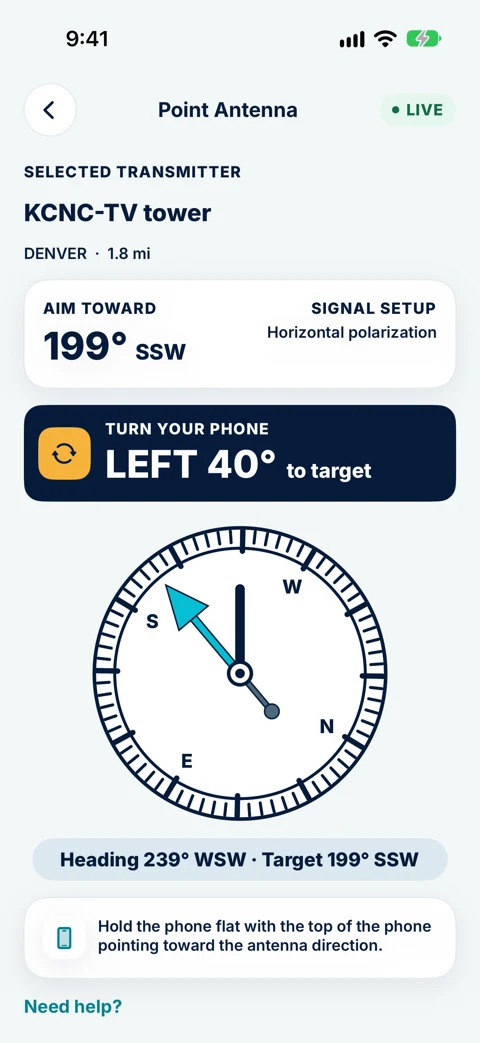
Tower Aim Point Antenna screen telling you to turn your phone left 40° toward the KCNC-TV tower in Denver
QUICK ANSWER

The short version.

Read this, then follow the steps below for the detail.

THE SHORT ANSWER

Which way should an RV antenna point?

At each campsite, point the antenna at the TV station tower that carries the networks you want and has a clear path to you. Raise the antenna fully, turn it toward the tower, then rescan channels on your TV. If the picture breaks up, try another station or move the RV: a ridge, trees or the next rig can be in the way.

DISCLOSURE

We make Tower Aim

Systemic Studios makes Tower Aim, the app this guide uses at each campsite, so weigh our advice knowing that. We also point to the FCC DTV Reception Maps, the government website, where they help. Other apps are described, not named. This guide is for antennas you turn by hand or with a crank.

AT EACH CAMPSITE

Aim at every campsite
in seven steps.

Step 1 happens before you leave home. The rest takes a few minutes at each stop.

1. Before you roll out, install the app

Install Tower Aim at home, before the trip, and open it once. Its FCC broadcast data is built into the app, and the terrain map is a one-time download that stays on your phone, so it's ready when you reach camp.

2. Find the station that serves your campsite

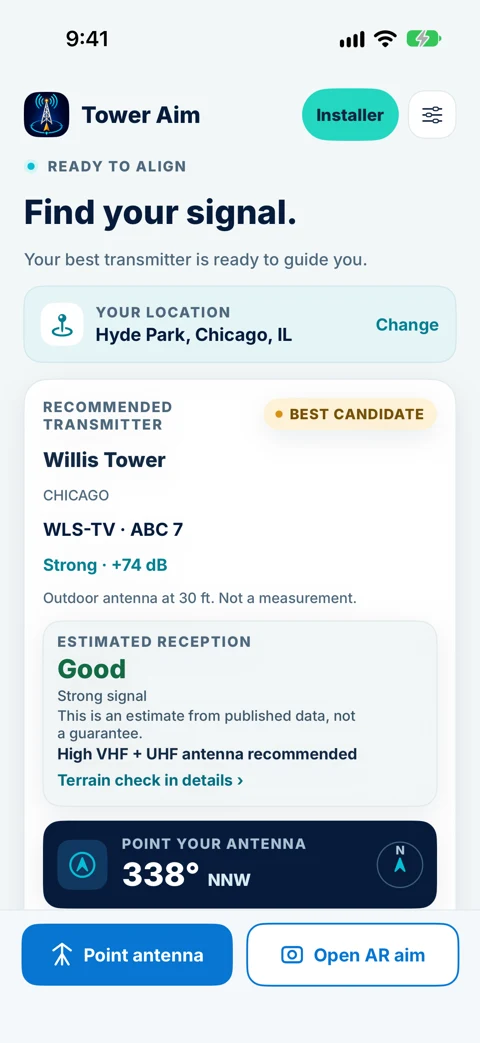
When you've parked, open Tower Aim. It uses your phone's location, or you can search a town or ZIP code. It recommends a station based on published power and distance, from FCC data covering 7,088 TV stations, and shows each station's channel, power, network name, band and polarization (Horizontal, Vertical or Mixed), so you can check the tower carries the networks you watch.

3. Check the terrain and the reception estimate

Before you raise the antenna, check the terrain line of sight to the tower: a ridge can block one campsite and not the next. Tower Aim also gives an estimated reception rating from Excellent to Poor and a predicted signal strength in dB, which assumes an outdoor antenna 30 feet up. An RV antenna sits lower, so treat a marginal station as a maybe. Neither is a measurement, and trees and buildings are not included.

4. Raise the antenna and switch on the booster

Crank the antenna all the way up before you turn it, and switch on the antenna booster (the powered wall plate) if your RV has one. Set the TV input to Antenna or Air, not Cable. An omnidirectional antenna has nothing to aim, so skip to step 6.

5. Turn the antenna toward the station

Take the direction outside, clear of the RV and the tow vehicle, because metal bodies can pull a phone compass. Tower Aim shows the bearing and compass direction to the station. Lock the bearing and it shows when you're on target; on supported iPhones and Android phones, AR shows 'aligned'. Pick a landmark that lines up, then turn the antenna until its front faces it, and check reception on your TV.

6. Rescan channels on your TV

Run a new channel scan at every campground. Channel line-ups change from market to market, and the list saved at your last stop will not match. A channel scan is not the same as flipping through channels.

7. Fine-tune, or try another station

Turn the antenna a few degrees at a time while you watch the TV's signal meter, then rescan. If the networks you want are missing, pick another station in Tower Aim, or move the RV a little: trees, buildings and the rig next door can block the signal. Once enough reports are in, you can also see what's worked for neighbors nearby.

Download on the App StoreGet it on Google Play

Made by Systemic Studios.

CAMPSITE CHECKLIST

What to check at each campsite.

The same checks every time, in the order that saves cranking the antenna twice.

Reception ratings and dB figures are predictions, not measurements. Reception varies from site to site, so treat every check as a guide.
CheckWhy it mattersIn Tower Aim
Saved on your phoneMany campgrounds have weak or no cell serviceFCC broadcast data is built in; one-time terrain download
Which stationEach campsite is served by different stationsA recommended station based on published power and distance, from your location or a town or ZIP search
NetworksMake sure the tower carries the networks you watchEach station's channel, power and network name
Band and polarizationYour antenna has to cover the station's bandBand and polarization (Horizontal, Vertical or Mixed) from FCC data, and a suggested antenna type for the band (UHF, high VHF or both)
Reception estimateSome stations are a long shot from an RV roofEstimated reception from Excellent to Poor, and a predicted signal strength in dB; never a measurement
TerrainA ridge can block one site and not the nextTerrain line of sight to the tower
DirectionA directional antenna has to face the towerBearing and compass direction; lock the bearing and it shows when you're on target, with AR on supported phones. Then check reception on your TV
RescanChannel line-ups change between marketsEach station's channel, to compare with what your TV finds
ObstructionsTrees, buildings and other RVs can block the signalNot included in the terrain check or the signal prediction, so look around your site
Local knowledgeWhat has worked for others nearbyWhat's worked for neighbors nearby, once enough reports are in
Second opinionHandy when you have internet before you arriveCompare with the FCC DTV Reception Maps, a government website
IN THE APP

Each campsite,
in Tower Aim.

Tower Aim screens prepared for the US App Store listing.

Find the station

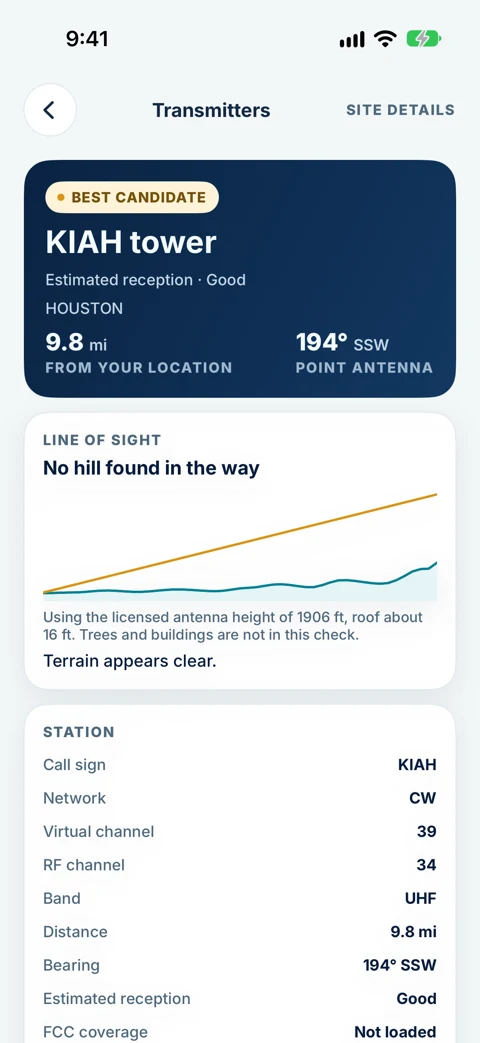
Tower Aim recommends a station from where you're parked, based on published power and distance, with its channel, network, band and an estimated reception rating.

Check the path

Look at the terrain line of sight to the tower before you raise the antenna.

Turn until on target

Lock the bearing and follow the compass while you line up the antenna. Tower Aim shows when you're on target; then check reception on your TV.

CRANK-UP ANTENNAS

Tips for crank-up
RV antennas.

Most RV antennas are raised and turned from inside with a crank. These habits make that quick.

Know which type you have

A crank-up batwing antenna is directional, so it has to face the tower. An omnidirectional antenna picks up signals from all around and is not aimed, but height and obstructions still matter. Tower Aim suggests the antenna type for the station's band (UHF, high VHF or both); check your antenna's manual for the bands it covers.

Mark the front

Put a small mark on the crank or ceiling plate showing which way the front of the antenna faces, so you can set the direction from inside the RV.

Take the direction outside

Read the direction away from the RV, then pick a landmark that lines up with it. Metal walls and roofs can throw a phone compass off inside.

Turn slowly, then wait

Turn a few degrees at a time and pause, because the TV's signal meter lags behind.

Lower it before you drive

Always crank the antenna down before you move. A raised antenna can hit trees, awnings and gas station canopies.

Park with the tower in mind

At a campground or a boondocking spot, moving a few feet, or turning the RV, can get the antenna out of the shadow of trees or the next rig.

PLANNING AND ON SITE

The FCC maps, Tower Aim and other apps.

Plan with the FCC DTV Reception Maps, aim on site with Tower Aim, and know what else is out there.

GOVERNMENT WEBSITE

FCC DTV Reception Maps

For planning, with internet

Enter the address of your next campground to see the stations predicted there, listed by signal strength, with each station's channel and its tower on a map. The FCC assumes an outdoor antenna 30 feet above ground, higher than an RV roof, so treat weaker stations as a maybe.

ON SITE

Tower Aim

Tower Aim: TV Antenna Finder

Works from where you're parked, or a town or ZIP you search, with FCC data covering 7,088 TV stations: channel, power, network name, band and polarization, an estimated reception rating and a predicted signal in dB. It adds a terrain line of sight, a compass with a locked bearing, and AR on supported phones. The broadcast data is built in, and the terrain check works from a one-time terrain download.

OTHER APPS

Other antenna apps

From antenna makers and independent developers

Several other apps also show nearby towers and a compass direction. Data sources, internet needs and ads vary, so check each store listing. Our US buyer's guide compares them.

ON THE ROADTOWER AIM FOR RVS

Aim at every campsite with Tower Aim.

Tower Aim: TV Antenna Finder · OTA Antenna Pointer & Compass

We make it. These are the parts that help at each campsite.

Download on the App StoreGet it on Google Play

Made by Systemic Studios.

FCC station data

FCC data covering 7,088 TV stations, with each station's channel, power, network name, band and polarization.

A recommended station

Based on published power and distance, from where you're parked or a town or ZIP code you search.

Estimated reception

Rated Excellent to Poor, with a predicted signal strength in dB. Always an estimate, never a measurement.

Terrain check

Terrain line of sight from a one-time terrain download, with the broadcast data built in.

Compass and AR

Lock the bearing and it shows when you're on target, with AR on supported phones. Then check reception on your TV.

Neighborhood reports

Optional and anonymous. See what's worked for neighbors nearby, once enough reports are in.

QUESTIONS

Frequently asked
questions.

More about the app: See everything Tower Aim does.

Which way should my RV TV antenna point?

At the TV station tower that carries the networks you want and has a clear path to your campsite. Tower Aim recommends a station based on published power and distance and shows the bearing and compass direction to it. Lock the bearing and it shows when you're on target. Then check reception on your TV.

How do I find TV stations near my campground?

Open Tower Aim where you're parked, or search a town or ZIP code. It uses FCC data covering 7,088 TV stations and shows each station's channel, power, network name, band and polarization, with an estimated reception rating. With internet, the FCC DTV Reception Maps, a government website, also list the stations predicted at an address.

How do I get Tower Aim ready before a trip?

Open it once at home before you leave. The broadcast data is built into the app, and the terrain map is a one-time download that stays on your phone, so it's ready at each campsite.

Why do I have to rescan channels at every campground?

Each area is served by different stations on different channels. Your TV only keeps what it found in its last scan, so run a new channel scan at every stop, with the TV input set to Antenna or Air.

Do I need to aim an omnidirectional RV antenna?

No. An omnidirectional antenna picks up signals from all around, so there is nothing to turn. Raise it fully, check for obstructions and rescan. A directional antenna, such as a crank-up batwing, has to face the tower.

Why is reception poor even though I'm pointing at the tower?

Check that the antenna is fully raised, the booster is on if your RV has one, and the TV input is set to Antenna or Air. Then check the terrain to the tower. A ridge, trees, buildings or the next RV can block the signal, so moving the RV a little can help. Another nearby station may also work better.

Does Tower Aim work with crank-up batwing antennas?

Yes. Tower Aim shows the bearing and compass direction to the station, and you turn the antenna with the crank until it faces that way. Lock the bearing and it shows when you're on target; then check reception on your TV. A mark on the crank showing which way the front faces makes this quicker.

Does Tower Aim measure signal strength?

No. Your phone cannot measure TV signal. Tower Aim shows an estimated reception rating from Excellent to Poor and a predicted signal strength in dB: a predicted margin above the FCC minimum for the station's band, assuming an outdoor antenna 30 feet up and using the Longley-Rice terrain model the FCC uses. It is a prediction, not a measurement or a guarantee, and trees and buildings are not included. Always check reception on your TV.

What antenna do I need for a station?

Tower Aim suggests the antenna type for the station's band (UHF, high VHF or both) and shows its polarization. Check your antenna's manual to see which bands it covers.

What if there are no TV stations in range?

Some remote campgrounds are out of range of every OTA station. There, TV usually means a satellite TV service, or streaming over campground Wi-Fi or your own data plan. Check the FCC DTV Reception Maps before you book if local channels matter to you.

Download on the App StoreGet it on Google Play

Made by Systemic Studios.