Point it at the transmitter or relay that serves you, along a path clear of hills, with the elements matching its polarisation.
Six practical steps, from finding your transmitter to the final retune. Each one shows how to do it with Tower Aim, our app, using RTR data.
No ads, no account.
QUICK ANSWER
The short version.
Read this, then follow the steps below for the detail.
THE SHORT ANSWER
Which way should my antenna point?
Point the antenna at the transmitter that serves your area. In the Alps and deep valleys that is often a local relay, not the big main transmitter. Check that no mountain blocks the path, then fine-tune and retune every TV.
WHO WROTE THIS
Systemic Studios, the makers of Tower Aim
Systemic Studios makes Tower Aim, the app this guide uses for each step. Roof work is dangerous: if your antenna is hard to reach, use a professional antenna installer.
SIX STEPS
How to aim a TV antenna, step by step.
Do steps 1 to 4 on the ground, before you get the ladder out.
1. Find your transmitter
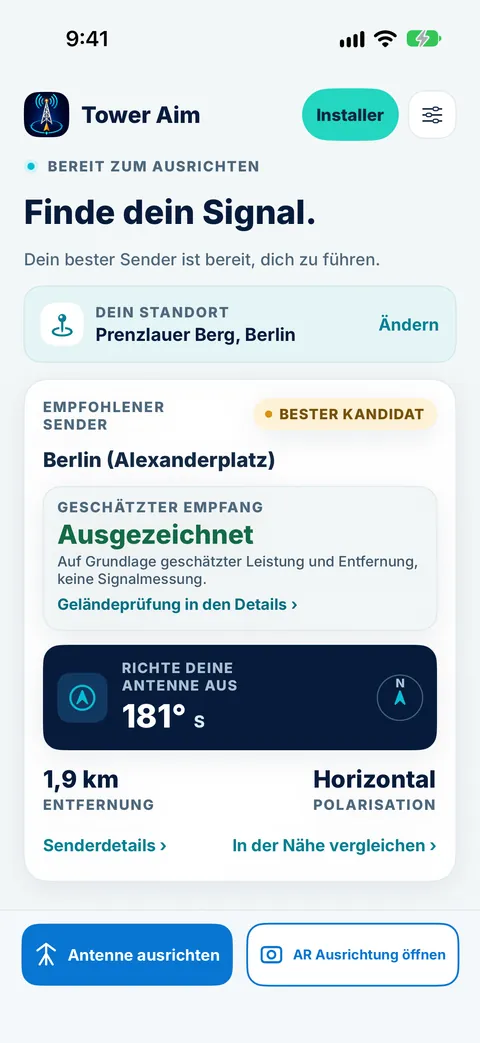
Your antenna should face the transmitter that serves you, which is not always the closest or the most powerful. Tower Aim recommends one based on published power and distance, not a signal measurement, from RTR Frequenzbuch data dated 14 October 2026: 520 licensed digital TV transmitters across 331 sites, MUX A to F, main transmitters and local relays. Search by town or postcode, or use your location.
2. Main transmitter or relay?
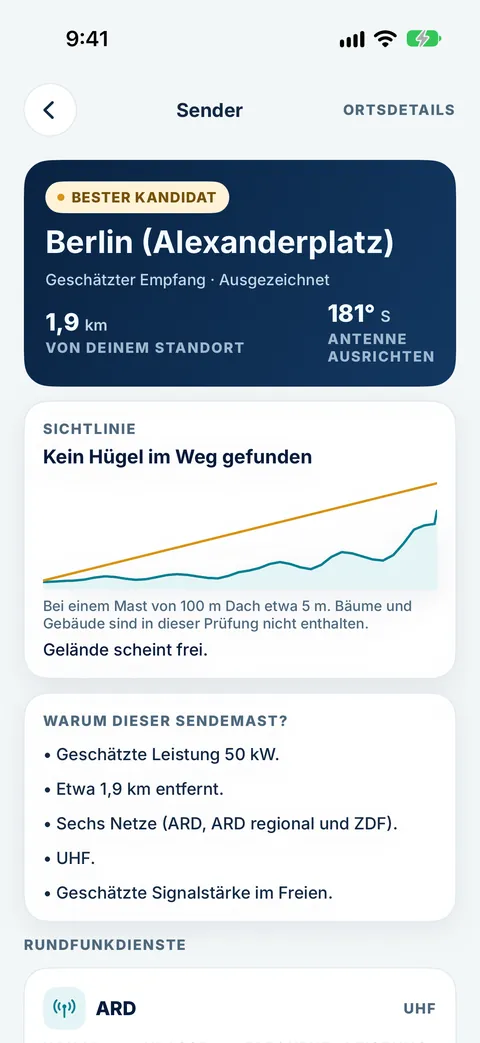
Relays fill the gaps the main transmitters cannot reach. Where the terrain map shows a hill blocking the main transmitter, Tower Aim suggests a clear local relay instead, and lists the others nearby so you can compare.
3. Match the polarisation
Main transmitters are mostly horizontal, and many local relays are vertical or mixed. Turn the antenna so its elements match. Tower Aim shows the polarisation, channel and power for each one.
4. Check the terrain
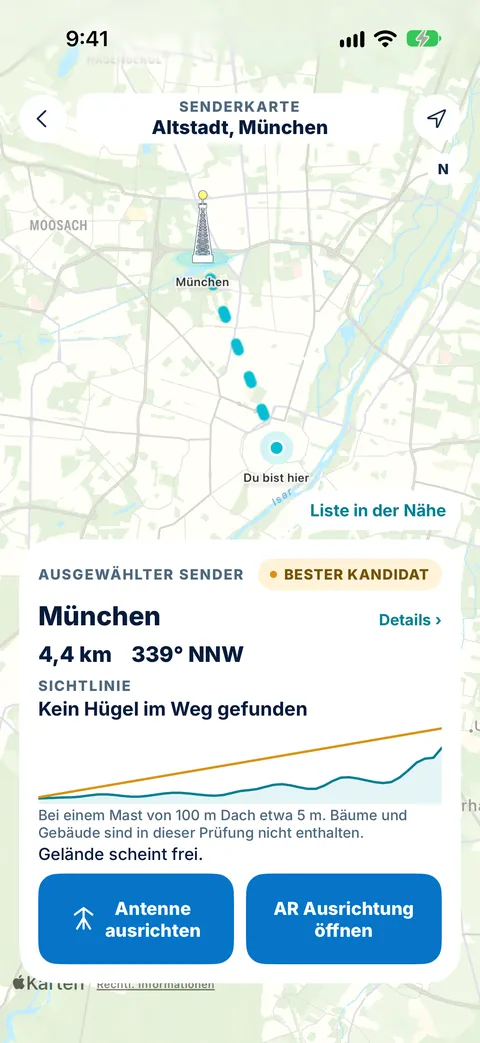
Tower Aim shows the elevation profile along the path, from a one-time terrain download. Tower Aim Installer adds finer terrain. Trees and buildings are not included, so treat it as a guide.
5. Aim with a compass
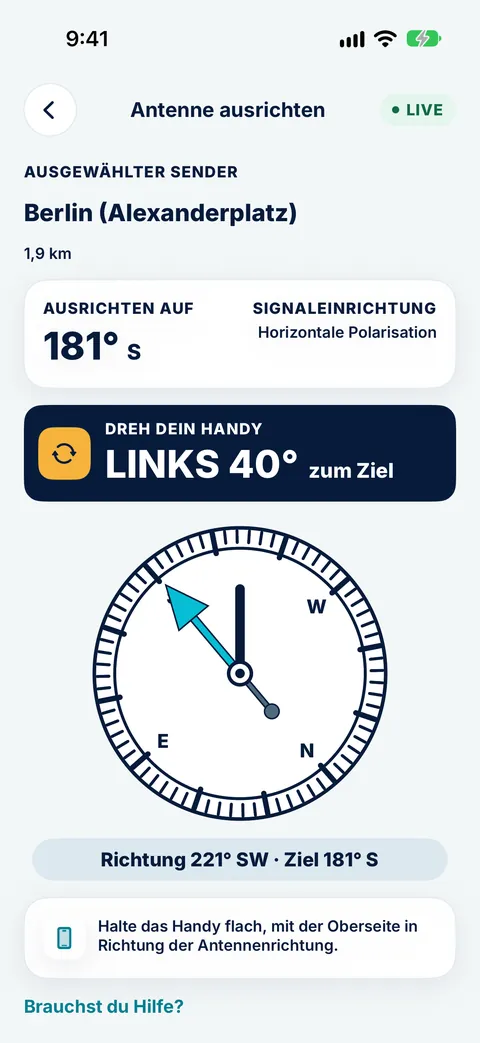
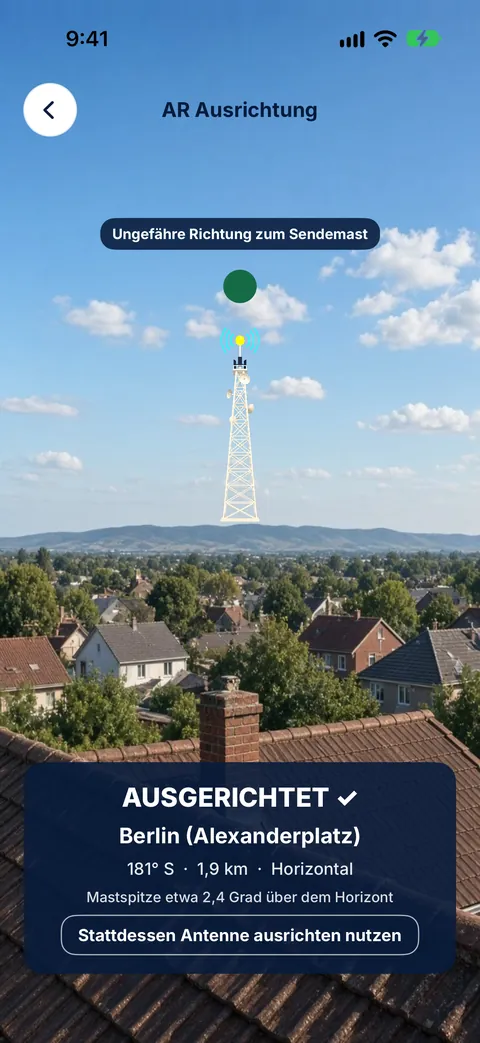
Face the bearing shown and follow the live compass arrow until it confirms you are on target. AR aiming works on supported phones.
6. Fine-tune and retune
Turn in small steps while someone watches the signal screen on the TV, then run a full retune on every TV.
No ads, no account.
WHERE TO CHECK EACH STEP
Each step in Tower Aim.
What to check at each step, and where to find it in the app.
Step
What to check
In Tower Aim
1. Find your transmitter
Which transmitter serves you
A recommended transmitter based on published power and distance, not a signal measurement, with estimated reception; RTR data dated 14 Oct 2026; search by town or postcode
2. Main transmitter or relay
Whether a hill blocks the path
Main transmitters and relays on the map; a clear local relay suggested where the terrain map shows a hill in the way
3. Polarisation
Horizontal, vertical or mixed
Shown for each transmitter, with its UHF channel, frequency and power
4. Terrain
Hills between you and the transmitter
Elevation profile from a one-time terrain download; finer terrain with Installer
5. Aim
The bearing to the transmitter
Live compass arrow that confirms when you're on target; AR aiming on supported phones
6. Fine-tune and retune
Signal quality on the TV, then a retune
Channel numbers and frequencies for each transmitter
On the roof
What's saved on your phone
Transmitter data built in; one-time terrain download
IN THE APP
See each step in Tower Aim.
Tower Aim screens with the app in German, as it runs in Austria. These examples were taken in Berlin and Munich.
Main transmitter or relay
Tower Aim picks a transmitter with a clear path and shows the line of sight.
Check the details
The details show the power, networks and polarisation of each transmitter.
Turn until on target
Follow the compass arrow, or AR aim on supported phones, while you turn the antenna, then check reception on your TV.
STEP 1Main transmitter or relay
STEP 2Check the details
STEP 3Turn until on target
ON THE ROOF
Tips that save a second climb.
Small habits that make the job quicker and safer.
Safety first
Only work on a roof if you can do it safely, never alone and never in wind or rain. If the antenna is high or hard to reach, use a professional antenna installer.
Check everything on the ground
Look up the transmitter, bearing, polarisation and terrain in Tower Aim before you climb, so the time on the roof is just aiming.
Calibrate the compass
If the arrow seems off, move the phone in a figure-eight to calibrate it, and keep it away from metal and magnets, including magnetic phone cases.
Look at the neighbours
Antennas nearby usually point at the same transmitter. If yours faces a different way, or its elements are the other way up, find out why before you change it.
Small moves, then wait
TV signal readouts lag a little. Turn a few degrees at a time and pause before you judge the picture.
Near a mobile mast?
Some UHF channels that used to carry TV are now used by 4G and 5G. If the picture breaks up near a mast, especially with an amplifier, a 4G/5G filter can help.
THE TOOL FOR EACH STEPTOWER AIM FOR HOME ANTENNAS
Do every step with Tower Aim.
Tower Aim: TV Aerial Finder
We make it. These are the parts that match the steps above.
No ads, no account.
Every transmitter in the RTR data
RTR Frequenzbuch data dated 14 October 2026: 520 licensed digital TV transmitters across 331 sites, MUX A to F, main transmitters and local relays. The recommended transmitter is based on published power and distance, not a signal measurement.
Main transmitters and relays
Where the terrain map shows a hill blocking the main transmitter, Tower Aim suggests a clear local relay and lists the others nearby.
Postcode search
Search by town or postcode, or use your location.
Terrain check
A terrain line of sight from a one-time terrain download, with finer terrain in Tower Aim Installer.
Compass and AR
A live compass arrow that confirms when you're on target, plus AR aiming on supported phones. Then check reception on your TV.
For professionals
Antenna installers, electricians and AV professionals can add Tower Aim Installer, an optional subscription, for jobs, readings from your own meter, photos and branded PDF reports.
At the transmitter that serves your area, with the elements matching its polarisation. Tower Aim recommends a transmitter based on published power and distance, not a signal measurement, and shows the bearing, polarisation and terrain to it.
Should I point at the main transmitter or a relay?
Whichever has a clear path to you. Where the terrain map shows a hill blocking the main transmitter, Tower Aim suggests a clear local relay instead.
Should I point my antenna at the closest transmitter?
Not always. A more powerful transmitter further away, or one with a clear path over the hills, can serve you better than a small one nearby. Tower Aim recommends a transmitter based on published power and distance, so check the terrain to each option too.
Should my antenna be horizontal or vertical?
Match the transmitter you are aiming at. Main transmitters are mostly horizontal, and many local relays are vertical or mixed. On a horizontal antenna the elements lie flat; on a vertical one they stand upright.
Where does Tower Aim's Austrian data come from?
From the RTR Frequenzbuch (data.rtr.at), dated 14 October 2026. It covers 520 licensed digital TV transmitters across 331 sites, MUX A to F, main transmitters and local relays.
Can I search by postcode?
Yes. Search by town or postcode, or use your location.
What does Tower Aim keep on my phone?
The transmitter data is built into the app, and the terrain map is a one-time download that stays on your phone. Open the app once on Wi-Fi before you head up.
Does Tower Aim measure signal strength?
No. Your phone cannot measure TV signal. Tower Aim recommends a transmitter based on published power and distance, and shows "Estimated reception" from Excellent to Poor. It is an estimate, not a measurement. Installers can record readings from their own meter with Tower Aim Installer.
Which phones does it work with?
iPhone with iOS 17 or later, and Android 8.0 or later.
 Systemic Studios