Point it at the station that serves you, with an antenna that covers its band, along a path clear of hills.
Six practical steps, from finding your station to the final channel scan. Each one shows how to do it with Tower Aim, our app, using ISED Spectrum Management System broadcast data.
No ads, no account.
QUICK ANSWER
The short version.
Read this, then follow the steps below for the detail.
THE SHORT ANSWER
Which way should my antenna point?
Point the antenna at the TV station that serves your area. Many Canadian stations broadcast on VHF, so check the band before you buy or climb. Check that no hill blocks the path, then fine-tune and run a channel scan on every TV.
WHO WROTE THIS
Systemic Studios, the makers of Tower Aim
Systemic Studios makes Tower Aim, the app this guide uses for each step. Roof work is dangerous: if your antenna is hard to reach, use a professional antenna installer.
SIX STEPS
How to aim a TV antenna, step by step.
Do steps 1 to 4 on the ground, before you get the ladder out.
1. Find your station
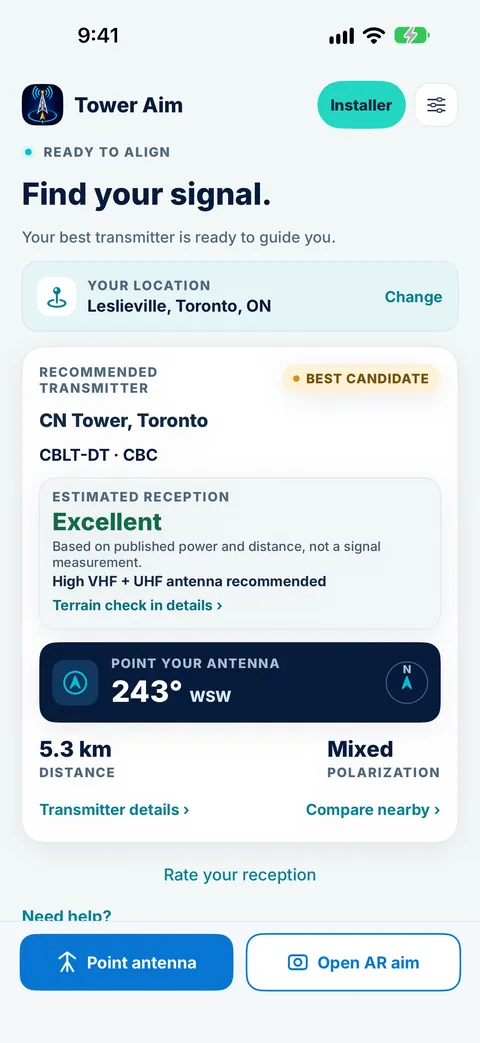
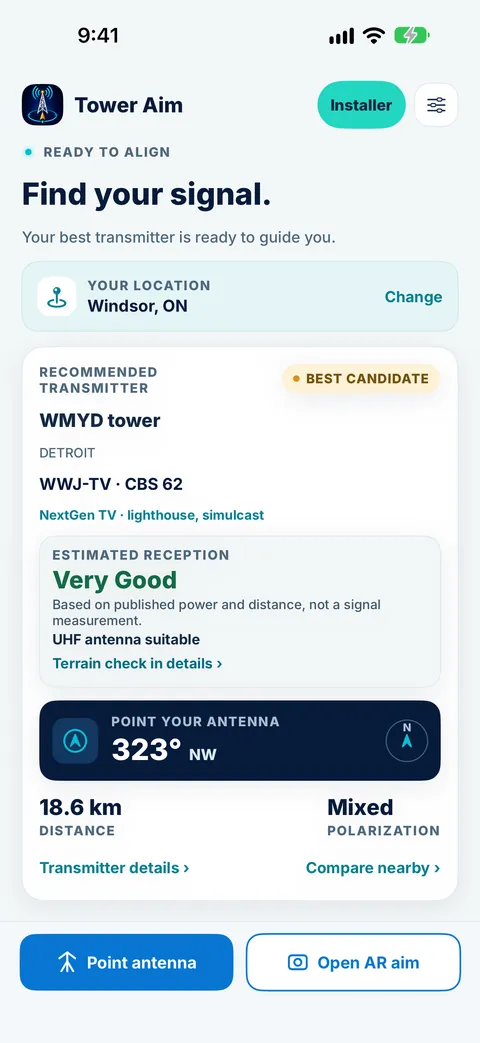
Your antenna should face the station that serves you, which is not always the closest. Tower Aim recommends a station based on published power and distance, not a signal measurement, from ISED Spectrum Management System broadcast data dated 6 October 2026: 274 Canadian digital TV stations across 137 sites, plus 558 US stations near the border. Search by postal code, city or town, or use your location.
2. Check VHF or UHF
92 of Canada's 274 digital TV stations broadcast on VHF. Tower Aim tells you whether a UHF antenna is enough, or whether you need high VHF, or low VHF support, for the stations around you.
3. Match the polarization
Most Canadian stations are horizontally polarized and some are mixed. Tower Aim shows the polarization, RF channel, call sign and power for each station.
4. Check the terrain
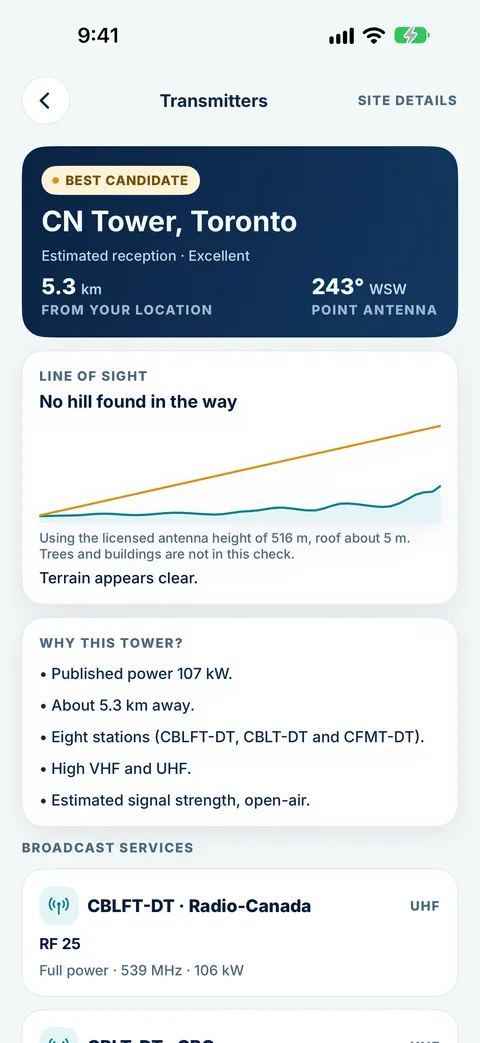
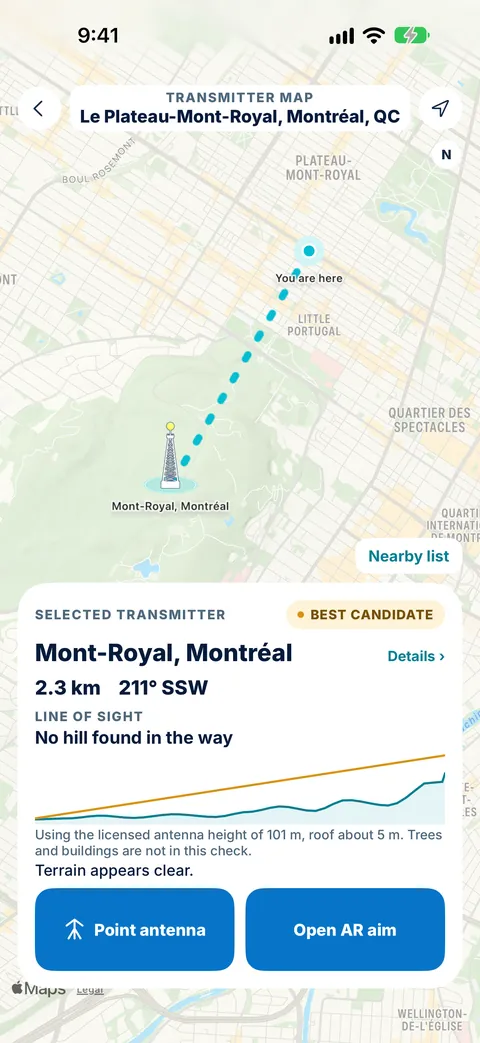
Tower Aim shows the elevation profile along the path, from the terrain map saved to your phone on first use. Tower Aim Installer adds finer terrain. Trees and buildings are not included, so treat it as a guide.
5. Aim with a compass
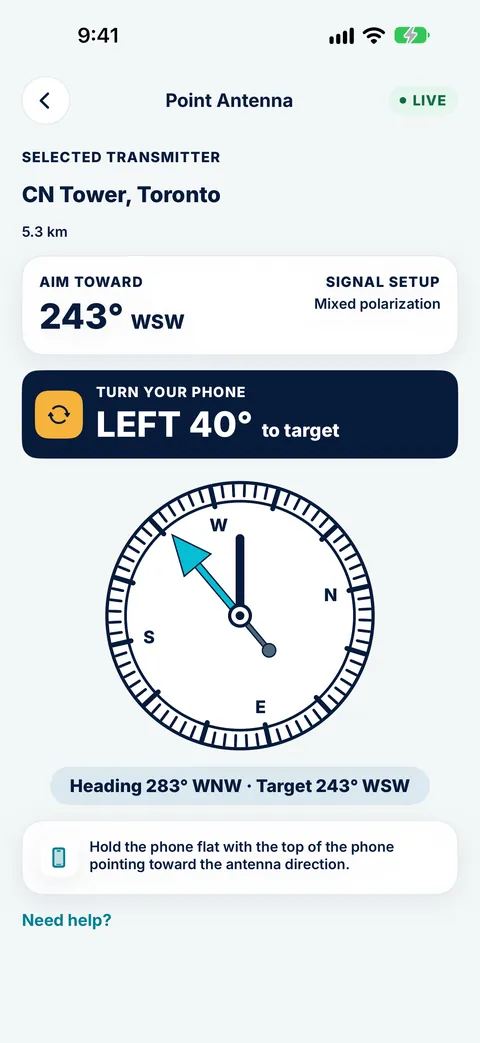
Face the bearing shown and follow the live compass arrow until it confirms you are on target. AR aiming works on supported phones.
6. Fine-tune and rescan
Turn in small steps while someone watches the signal screen on the TV, then run a full channel scan on every TV. Near the border, US stations may be the stronger choice; Tower Aim lists them alongside Canadian stations.
No ads, no account.
WHERE TO CHECK EACH STEP
Each step in Tower Aim.
What to check at each step, and where to find it in the app.
Step
What to check
In Tower Aim
1. Find your station
Which station serves you
A recommended station based on published power and distance, not a signal measurement, with estimated reception; ISED Spectrum Management System broadcast data dated 6 Oct 2026, plus US border stations
2. VHF or UHF
Whether your antenna covers the band
Whether a UHF antenna is enough, or you need high VHF or low VHF support
3. Polarization
Horizontal or mixed
Shown for each station, with its RF channel, call sign and power
4. Terrain
Hills between you and the station
Elevation profile from a one-time terrain download; finer terrain with Installer
5. Aim
The bearing to the station
Live compass arrow that confirms when you're on target; AR aiming on supported phones
6. Fine-tune and rescan
Signal quality on the TV, then a channel scan
RF channels for each station, with US border stations listed alongside
On the roof
What's saved on your phone
Station data built in; terrain map saved on first use
IN THE APP
See each step in Tower Aim.
Real Tower Aim screens in Toronto, Montréal and Windsor.
Find and check
See the recommended station, its call signs and power, and whether you need VHF or UHF.
Check the path
Look at the elevation profile to the station before you climb.
Check border stations
Near the border, the best station can be in the US. In Windsor, Tower Aim recommends a Detroit station.
STEP 1Find and check
STEP 2Check the path
STEP 3Check border stations
THE TOOL FOR EACH STEPTOWER AIM FOR HOME ANTENNAS
Do every step with Tower Aim.
Tower Aim: TV Antenna Finder
We make it. These are the parts that match the steps above.
No ads, no account.
Every station in ISED's extract
ISED Spectrum Management System broadcast data dated 6 Oct 2026: 274 Canadian digital TV stations across 137 sites, including low-power stations, with channels, frequencies and power. The recommended station is based on published power and distance, not a signal measurement.
VHF and UHF advice
92 of the 274 stations are VHF, so Tower Aim tells you whether UHF is enough or you need high VHF or low VHF support.
US border stations
558 US stations near the border are listed alongside Canadian stations, so you can compare before you aim.
Terrain check
A terrain line of sight from a one-time terrain download, with finer terrain in Tower Aim Installer.
Compass and AR
A live compass arrow that confirms when you're on target, plus AR aiming on supported phones.
In English and French
The app follows your phone's language, in English or French.
Neighbourhood reports
See what's worked for neighbours nearby, once enough reports are in.
For professionals
Antenna installers, electricians and AV professionals can add Tower Aim Installer, an optional subscription, for jobs, readings from your own meter, photos and branded PDF reports.
At the station that serves your area, with an antenna that covers its band. Tower Aim recommends a station based on published power and distance, not a signal measurement, and shows the bearing, band, polarization and terrain to it.
Do I need a VHF or UHF antenna?
It depends on the stations around you. 92 of Canada's 274 digital TV stations broadcast on VHF, most of them high VHF. Tower Aim tells you whether a UHF antenna is enough, or whether you need high VHF or low VHF support.
Should I point my antenna at the closest station?
Not always. A stronger station further away, or one with a clear path over the hills, can serve you better than a small one nearby. Tower Aim recommends a station based on published power and distance, so check the terrain to each option too.
Can I get US stations?
Often, near the border. Tower Aim includes 558 US stations near the border, listed alongside Canadian stations, so you can see the bearing and terrain to each before you aim.
Where does Tower Aim's Canadian data come from?
From ISED Spectrum Management System broadcast data (Innovation, Science and Economic Development Canada), dated 6 October 2026: 274 digital TV stations across 137 sites, including low-power stations, plus 558 US stations near the border from the FCC.
Is Tower Aim available in French?
Yes. The app follows your phone's language, so it shows in French when your phone is set to French.
What does Tower Aim keep on my phone?
The station data is built into the app, and the terrain map is saved to your phone on first use. Open the app once on Wi-Fi before you head up.
Does Tower Aim measure signal strength?
No. Your phone cannot measure TV signal. Tower Aim recommends a station based on published power and distance, and shows "Estimated reception" from Excellent to Poor. It is an estimate, not a measurement. Installers can record readings from their own meter with Tower Aim Installer.
Which phones does it work with?
iPhone with iOS 17 or later, and Android 8.0 or later.
 Systemic Studios