Start a Project

22 NFC tag ideas for home, work and the car

What a tag can and can't do

A tag stores one small piece of information. When a phone taps it, the phone shows that information or offers to open it. Links usually open straight away. Other types, like contact cards, Wi-Fi details and notes, depend on the phone. A tag doesn't run shortcuts, routines or smart-home actions on its own, so ideas that need those are written here as notes or links.

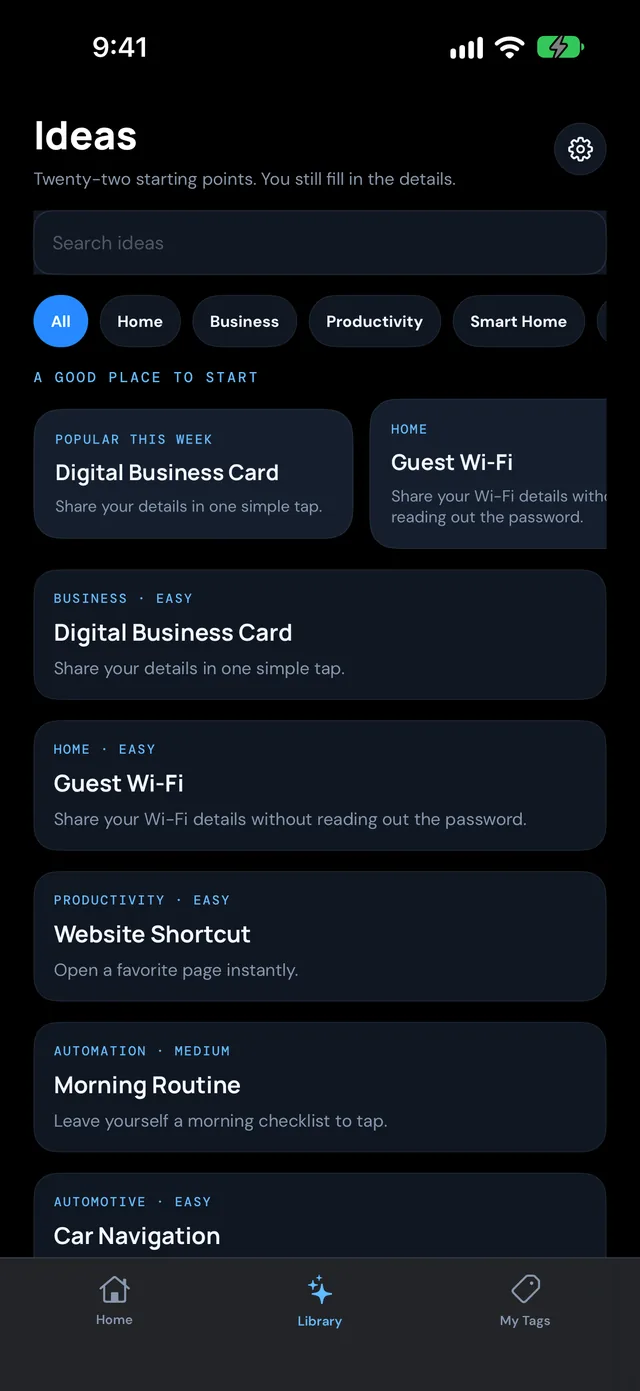
Each idea below is in the NFC Ninja Ideas Library. Picking one sets the action and a name, and you fill in your own details.

NFC Ninja Ideas Library on iPhone showing tag ideas with category chips
App design preview

At home

  • Guest Wi-Fi. Share your Wi-Fi details without reading out the password. Holds the network name and password. See Share guest Wi-Fi with an NFC tag.
  • Emergency Contact. Keep a trusted contact close at hand. Holds a phone number.
  • Send a Message. Compose a thoughtful text in a tap. Holds a pre-written text message.
  • Share My Location. Open a map pin for a familiar place. Holds a location.
  • Home Assistant. Open your favourite home control. Holds a link to your own dashboard address. The tag opens the page; it doesn't control devices by itself.
  • Smart Lights (note). Leave a note about the light settings by the door. Holds text that people read.

For work and business

  • Digital Business Card. Share your details in one simple tap. Holds a contact card. See How to make an NFC digital business card.
  • Portfolio Link. Put your work one tap away.
  • Email Me. Start a pre-addressed email.
  • Studio Wi-Fi. Share your studio network details with clients.
  • LinkedIn Profile. Share your professional profile.
  • Review My Business. Make leaving a review effortless.
  • Event Check-in. Link attendees to your event page.
  • Contactless Menu. Share your menu without a printed copy.

More on these: NFC tags for business: 8 practical uses.

On your desk

  • Website Shortcut. Open a favourite page instantly.
  • Focus Mode (note). Keep a short focus reminder on your desk.
  • Desk Reset (note). Keep an end-of-day checklist on your desk.
  • Morning Routine (note). Leave yourself a morning checklist to tap.

In the car

  • Car Navigation. Open your usual destination in Maps. Holds a location.

Social and creative

  • Instagram Profile. Open your profile from a tap.
  • Weekend Playlist. Bring the soundtrack with you. Holds a link.
  • Custom Note (note). Leave a short note for the next person who scans it.

About the five note ideas

Morning Routine, Focus Mode, Desk Reset, Smart Lights and Custom Note hold plain text. When someone taps the tag, the phone shows the words. Nothing else happens: no shortcut, routine or smart-home action runs. They work well as a checklist or reminder that lives where you need it.

Make one with NFC Ninja

NFC Ninja is coming soon to iPhone and Android. These steps follow the current app design.

  1. Open the Library tab and pick an idea. Use the category chips to narrow the list.
  2. Tap Use this idea and fill in your details.
  3. Check the preview, including how much space it needs on the tag.
  4. Write the tag. If the tag already has something on it, NFC Ninja asks before replacing it.
  5. NFC Ninja reads the tag back and only shows success when the contents match.

New to tags? Start with How to read an NFC tag with your phone or How to write an NFC tag on iPhone.

COMING SOON TO IPHONE AND ANDROID

Set up your first tag with NFC Ninja

Pick an idea, build the tag in a few taps, write it, and see it verified. No account needed.

Frequently asked
questions

What can I put on an NFC tag?

One item: a website link, contact card, Wi-Fi network name and password, email, phone number, text message, map location, social profile, custom link or a short text note.
Can an NFC tag run an automation?

Not on its own. A tag holds information. A text note is shown as text and doesn't trigger shortcuts, routines or smart-home actions.

Which idea is best for a small business?

A review link, a contactless menu link and a digital business card are the most common starting points.

Do I need to fill in every idea?

Yes. An idea sets the action and a name. You add your own link, details or note.