NFC tags for business: practical uses that save your team time
APP DESIGN PREVIEW
What is an NFC tag?
NFC (near field communication) lets a phone read a tiny chip from a few centimetres away. An NFC tag is that chip inside a sticker, card or keyring. It holds a short instruction, such as a web link or a contact card, and the phone acts on it when someone taps.
Tags have no battery and don't need to be plugged in. Once written, they keep doing the same job until you change them.
8 practical uses for NFC tags in your business
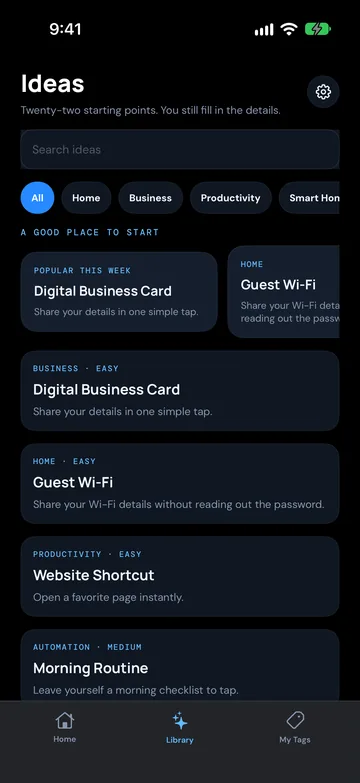
Each of these matches an idea in NFC Ninja's Library tab, most of them under the Business chip. Tap Use this idea to set up the right action and name, then add your own details, such as your review link or menu address.
1. Get more reviews at the counter
Put a review tag next to the register or on the receipt tray. A happy customer taps once and lands on your review page, instead of searching for your business later and forgetting. Library idea: Review My Business.
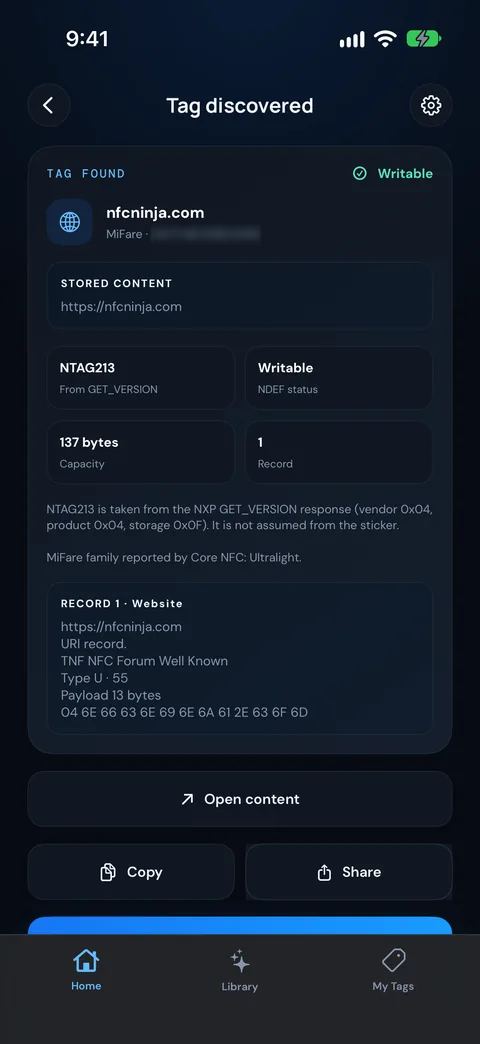
BETA BUILD · REAL TAG READ
2. Open your menu at the table
A tag on each table opens your online menu. It sits alongside a QR code for customers who'd rather use the camera, and you can update the menu online without reprinting anything. Library idea: Contactless Menu.
3. Check people in at events and visits
A tag at the door opens your check-in or event page, so arrivals sign in on their own phone instead of queuing for a clipboard. Library idea: Event Check-in.
4. Share your contact details in one tap
A tag on the back of your card or phone case saves your name, number and email straight into the other person's contacts. See the full setup in Make an NFC business card people save in one tap. Library idea: Digital Business Card.
5. Show your work
Designers, trades and photographers can link a tag to a portfolio or project gallery. Put it on a quote folder, a site sign or a display piece. Library idea: Portfolio Link.
6. Connect on LinkedIn
At networking events, a tap opens your LinkedIn profile, so the connection happens on the spot. Library idea: LinkedIn Profile.
7. Start an email to the right inbox
A tag that starts a pre-addressed email is handy for enquiries, feedback or "send me the brochure" requests. The customer's phone opens a new email with your address already in it. Library idea: Email Me.
8. Jump straight to your booking page
Link a tag to your bookings or quote request page and put it at reception or on your van. People book while they're thinking about it. Library idea: Website Shortcut.
Where to stick your tags
Counter or register: reviews, bookings, email enquiries.
Tables: menus.
Reception or entry: check-in, bookings.
Business cards, lanyards and phone cases: contact details, LinkedIn, portfolio.
Display stands and quote folders: portfolio, booking page.
Two practical tips:
Add a small prompt such as "Tap your phone here" so people know what to do.
Avoid sticking tags directly onto metal. Metal can stop a standard tag from being read. Use a tag made for metal surfaces, or mount it on a plastic or card stand.
How to write and check a business tag
App design preview
Open NFC Ninja and tap Write a Tag on Home, then answer "What should your tag do?". Or open the Library tab, pick an idea and tap Use this idea.
Fill in your details, such as your review link or menu address, then tap Preview tag and check it.
Tap Write to tag and hold the tag to your phone. On iPhone, hold the top of the phone near the tag.
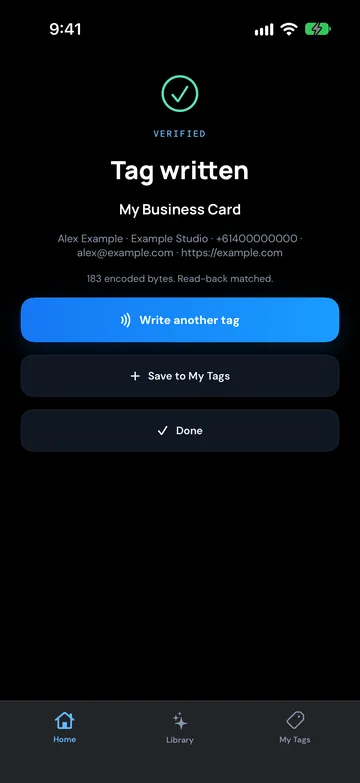
NFC Ninja reads the tag back (Checking the tag) and only shows Tag written when the contents match, so you know it's right before you stick it down.
Tap Write another tag for your next table or counter, or Done when you're finished. If the setup isn't saved yet, tap Save to My Tags to keep it in the My Tags tab.
If a tag already has something on it, NFC Ninja asks Overwrite this tag? before replacing it. It never locks a tag, so you can update a tag later if your link changes.
A note on iPhone and Android
Phones handle tags a little differently. Some examples worth knowing:
Wi-Fi tags: a Wi-Fi tag, such as the Guest Wi-Fi or Studio Wi-Fi idea, can join a network on Android only. iPhone can't join Wi-Fi from an NFC tag, so keep a printed password or QR code handy for iPhone users.
Links are the most dependable choice for customers. iPhone XS and later can read a link from a tag without opening an app first. A link to your review page, menu or booking page is the safest choice for customer-facing tags.
NFC Ninja itself (coming soon) will need iOS 17 on iPhone XS, XR or later (or iPhone SE 2nd generation or later), or Android 8.0 or later.
When a tag isn't enough
A tag is great at getting someone to the right place in one tap. It doesn't do anything with what happens next. If your check-ins still get typed into a spreadsheet, or your enquiries land in three different inboxes, the real time saving is connecting those systems so the data flows by itself.
For jobs where customers need a link, yes. A tag removes the "search for us later" step, which is where reviews, bookings and enquiries often get lost. They're easy to try: write one tag, put it on the counter and see if people use it.
Can customers use NFC tags without an app?
Usually, for links. iPhone XS and later can read a link from a tag without opening an app, and most Android phones with NFC switched on do the same. You only need NFC Ninja to write the tag, not to tap it.
Can I change what an NFC tag does later?
Yes, as long as the tag hasn't been locked. NFC Ninja never locks a tag, asks Overwrite this tag? before replacing data, and keeps your setups in the My Tags tab so you can edit and rewrite them.
Should I use NFC tags or QR codes?
Use both. A QR code works for people who prefer the camera, and a tag is quicker for people who just tap. Putting them side by side covers more customers.
Can an NFC tag connect guests to my Wi-Fi?
On Android, yes. iPhone can't join Wi-Fi from an NFC tag, so pair a Wi-Fi tag with a printed password or QR code.
Which NFC tags should I buy?
NFC Ninja has been tested on iPhone with NTAG213 tags for reading, writing, read-back and overwriting. NTAG213 stickers are widely sold and hold enough for a web link or a short contact card.
 Systemic Studios