Start a Project

How to read an NFC tag with your phone

Where to hold your phone

  • iPhone: the NFC reader is near the top edge. Hold the top of the iPhone close to the tag.
  • Android: the reader is usually on the back. Make sure NFC is switched on in Settings, then hold the back of the phone over the tag.

Keep the phone still until it responds. If nothing happens, move it slowly across the tag, and take off a thick or metal case.

What you'll see on the tag

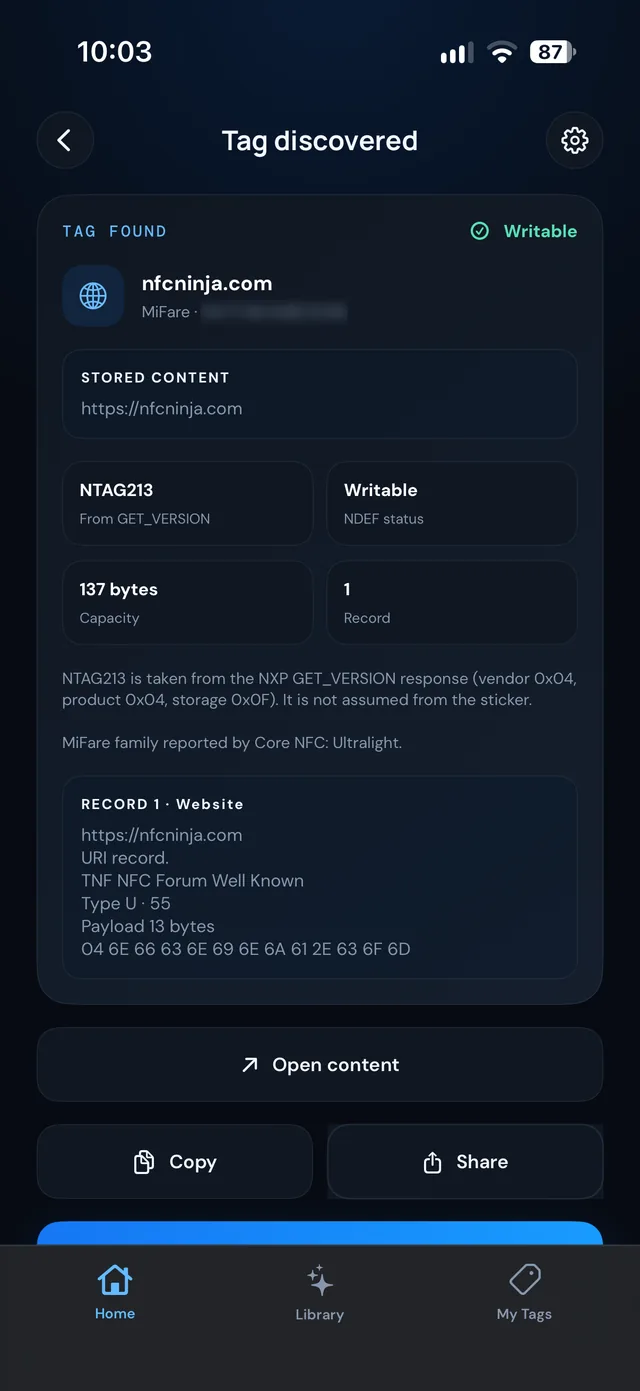
Reading a tag with NFC Ninja shows:

  • The content: a link, contact card, Wi-Fi details, plain text and more.
  • Whether it can be written: writable tags can be changed later; locked tags can't.
  • Capacity: how much space the tag has.
  • Record details: each record on the tag, including the raw data in hex, for when you want to check exactly what's there.
NFC Ninja on iPhone showing the details read from an NTAG213 tag
Reading an NTAG213 tag on iPhone. Serial number blurred.

Read a tag with NFC Ninja

NFC Ninja is coming soon to iPhone and Android. These steps follow the current app design.

  1. Open NFC Ninja and tap Read a Tag.
  2. On iPhone, hold the top of the phone near the tag. On Android, tap Start scanning first, then hold the back of the phone near the tag. The phone listens for about a minute.
  3. Check what's on the tag: content, whether it can be written, capacity and records.
  4. Choose what to do next: Open the content, Copy it, Share it, or Save it to My Tags so you can write the same thing to another tag later.

If the tag won't read

  • Hold still for a moment. Most misses are a phone moving too fast.
  • Try a different spot on the phone and the tag.
  • Remove a thick or metal case, and keep the tag off metal surfaces.
  • On Android, check NFC is on, and tap Start scanning again if a minute has passed.

What to do next

Found a blank tag? Turn it into something useful with 22 NFC tag ideas, or follow How to write an NFC tag on iPhone.

COMING SOON TO IPHONE AND ANDROID

Set up your first tag with NFC Ninja

Pick an idea, build the tag in a few taps, write it, and see it verified. No account needed.

Frequently asked
questions

Where is the NFC reader on an iPhone?

Near the top edge. Hold the top of the iPhone close to the tag.
Where is the NFC reader on an Android phone?

Usually on the back. Switch NFC on in Settings and hold the back of the phone over the tag.

Can I see what's on a tag before I open it?

Yes. A reader app like NFC Ninja shows the content and record details first, and you choose whether to open, copy, share or save it.

Why won't my phone read the tag?

The most common reasons are moving too fast, the wrong spot on the phone, a thick or metal case, or NFC switched off on Android.