Start a Project

Share guest Wi-Fi with an NFC tag

What happens when a guest taps the tag

  • Android: many phones offer to join the network. It depends on the phone, so try it with the phones your guests use.
  • iPhone: the iPhone doesn't join a network from an NFC tag. NFC Ninja can read the tag and shows the network name, but not the password, so iPhone guests join in Settings > Wi-Fi using the password on your printed card.

On Android, nobody has to spell out a long password.

Set up a guest Wi-Fi tag

NFC Ninja is coming soon to iPhone and Android. These steps follow the current app design.

  1. Open the Library and tap Use this idea on Guest Wi-Fi, or Studio Wi-Fi for a workplace. Or tap Write a Tag and choose the Wi-Fi action.
  2. Enter the network name and password exactly as they are on your router.
  3. Preview the tag and check the network name. The preview doesn't show the password, so check it carefully as you type it.
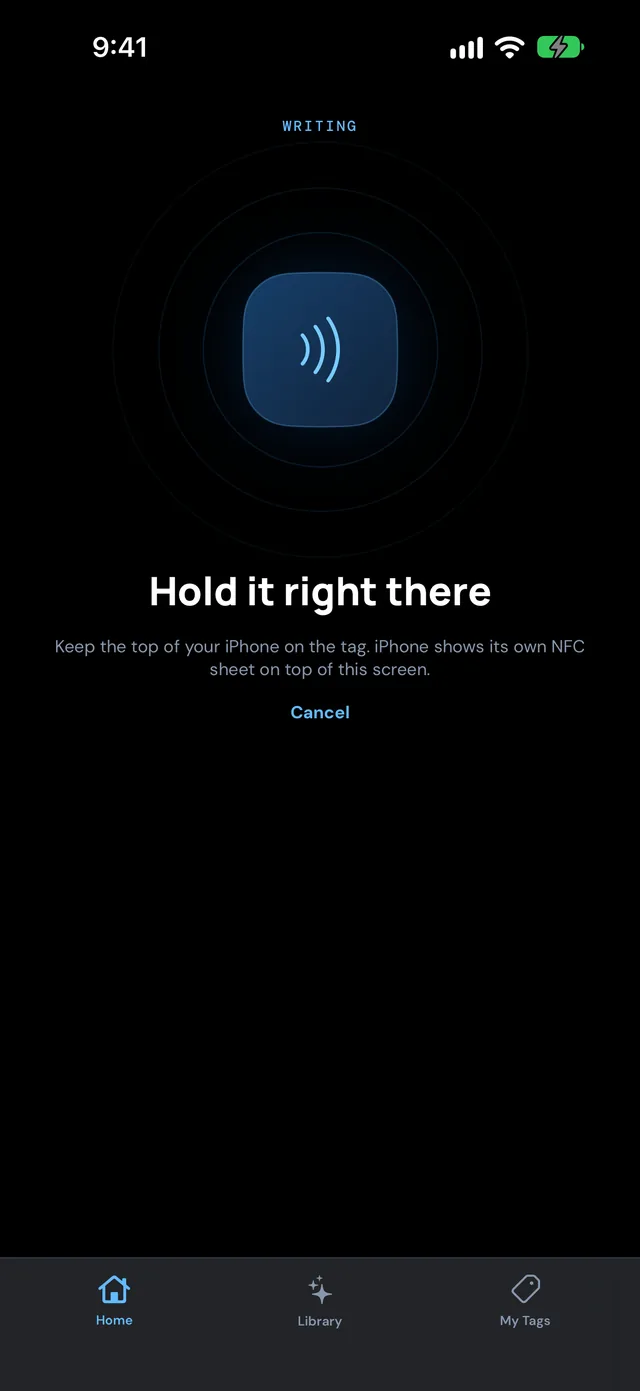
  4. Hold the tag near your phone to write it. NFC Ninja asks before replacing anything already on the tag.
  5. NFC Ninja reads the tag back and only shows success when the details match.
NFC Ninja on iPhone asking you to hold the phone near the tag to write it
App design preview

Where to put it, and keeping it safe

  • Put it by the front door, on the fridge, at reception or on a desk stand, with a small label like "Tap for Wi-Fi".
  • Use a separate guest network, not your main one. Anyone who taps the tag can see the password.
  • Changed the password? Open the setup in My Tags, update it and write the tag again.

Prefer a printed backup?

Keep the network name and password on a small card next to the tag for iPhone guests and anyone whose phone doesn't have NFC switched on.

COMING SOON TO IPHONE AND ANDROID

Set up your first tag with NFC Ninja

Pick an idea, build the tag in a few taps, write it, and see it verified. No account needed.

Frequently asked
questions

Can an NFC tag connect an iPhone to Wi-Fi?

No. An iPhone doesn't join a network from an NFC tag. iPhone guests join in Settings > Wi-Fi.
Do Android phones join the network from the tag?

Many Android phones offer to join when they tap a Wi-Fi tag, but it depends on the phone.

Is it safe to put my Wi-Fi password on a tag?

Anyone who taps the tag can see the password, so use a guest network.

What if I change my Wi-Fi password?

Update the setup in My Tags and write the tag again. NFC Ninja never locks tags.