Site Measurement Report: What to Include, With an Example
What a site measurement report should include
Your business details. Logo, business name, phone, email, website and address, so the report is clearly yours.
Customer and site. Customer name, contact, site address and a job reference.
A measurement summary. Every size in one list: the item (Window 1, Door 1, Benchtop 1), the room or area, the size and unit.
Where each size came from. Typed from a tape, spoken, an AR estimate or a LiDAR scan.
What has been checked. A clear status for each size, so everyone can see which numbers are confirmed and which still need checking before anything is ordered.
Photos with the size drawn on. A photo of each opening or run with a dimension line on it beats a page of numbers.
Notes. Product, fit, obstructions, access, and anything to confirm on the next visit.
Date, reference and page numbers, so revised reports are easy to tell apart.
Sample report: what a branded site measurement report looks like
This walk-through uses the Mitchell Residence sample project that ships in Measure Genie (fictional customer and business).
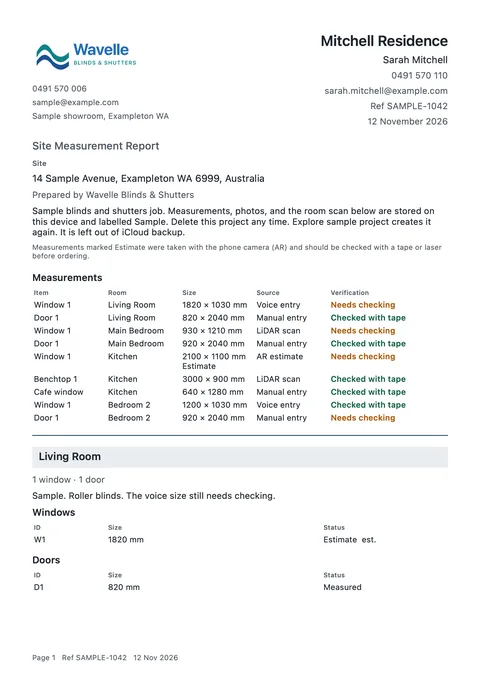
Header: the business logo and name on one side; the job name (Mitchell Residence), customer (Sarah Mitchell), contact and date on the other.
Title and site: "Site Measurement Report", then the site address.
Measurements: one table for the whole job with columns for Item, Room, Size, Source and Verification. The sample has nine sizes across the Living Room, Main Bedroom, Kitchen and Bedroom 2. Sources read Voice entry, Manual entry, LiDAR scan or AR estimate. Verification reads Needs checking, Checked, Checked with tape or Checked with laser, and sizes that haven't been checked carry "est.".
Estimate legend: a line explaining that sizes marked Estimate were taken with the phone camera and should be checked with a tape or laser before ordering.
Photos: each room's photos with their dimension lines.
Notes: the job and room notes, such as "Roller blinds" or "Plantation shutters".
Paper size: A4 or Letter.
Extra detail in the iPhone report: the job reference in the header, photos grouped under Before, During and After, a Floor plan heading and image inside the section of any room scanned with LiDAR, and a footer on every page with the page number, reference and date.
Report PDF, page 1: Kitchen Window 1 at 2100 x 1100 mm marked Estimate, an “est.” size and the Page, Ref and date footer
How to build the report on site, step by step
Set up the job once. Customer, contact and site address go on the project, so they flow into the report.
Add a room or area for each space (Living Room, Kitchen, Fence line, Deck).
Measure and record. Type sizes from your tape, say them ("Window one, 1820 by 1450") and confirm the card, or take a quick AR estimate.
Photograph and mark up. Draw the dimension line on the photo while you are standing at the opening.
Mark what you checked. Set each size to Checked with tape once you have measured it. Leave estimates as Needs checking.
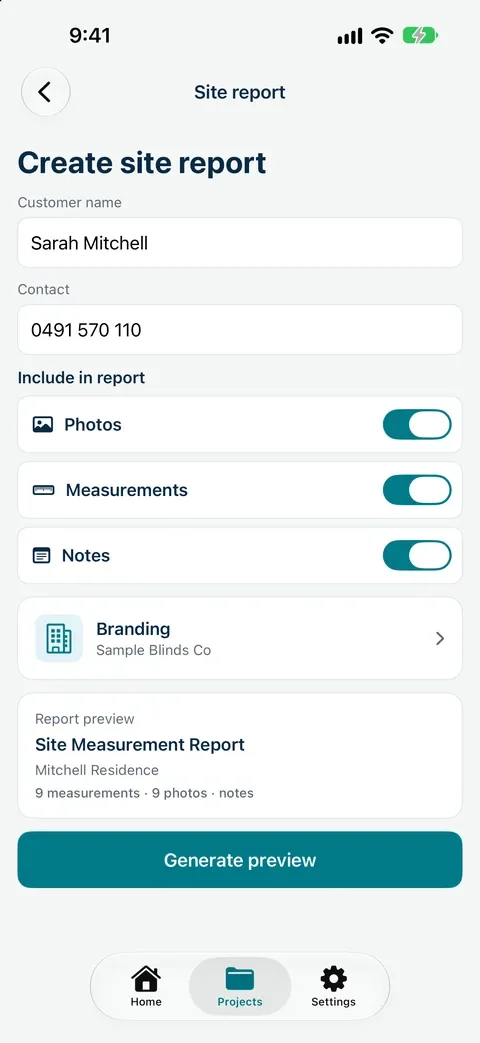
Create the site report. On iPhone, Create site report lets you confirm the customer name and contact, choose whether photos, measurements and notes go in, check your branding and tap Generate preview. On Android, open Site Measurement Report.
Share the PDF by email, message or files before you leave the driveway.
Create site report on iPhone
Measure the job, mark what you checked and send a branded site measurement report from your phone.
Paper form or report from the app?
Paper site measurement form: quick to print, but photos live in your camera roll, estimates and checked sizes look the same, and someone retypes it later.
Site measurement report from Measure Genie: sizes sit under the right room, photos carry the dimension lines, each size shows its source and check status, and the customer gets a branded PDF from site.
Common mistakes in site measurement reports
Sizes with no room or item label ("1820 x 1450" on its own).
No unit, or mixed units on one job.
Estimates passed on as final sizes.
Photos that don't show which opening they belong to.
No date, so two versions of the report get mixed up.
Your measure, your brand, sent from site
Add your branding once, then share a PDF site measurement report from your phone before you leave.
A document that records the sizes, photos and notes from a measuring visit, grouped by room, so the customer, workroom or installer can act on it.
What should a site measurement report include?
Your business details, the customer and site, every size with its room and unit, where each size came from, which sizes were checked, photos and notes.
Is a site measurement report the same as a quote?
No. The report records what was measured. Use it to prepare your quote in the system you already use.
Can I send the report to the customer from site?
Yes. Measure Genie creates a branded PDF that you can share from your phone by email, message or files.
Can the report show which sizes are estimates?
Yes. Each size shows its source and verification status, and sizes that haven't been checked are marked "est.".
 Systemic Studios