Start a Project

How to Run a Measure and Quote Visit

Before the visit

  • Customer name, contact and site address on the job
  • Products the customer is interested in
  • Tape, ladder, samples, phone charged
  • A room or area list if the customer has given you one

In Measure Genie you can start the job by voice. Tap Speak project details on iPhone or Speak job details on Android, say something like "New job for John Smith, 24 Example Road", then check the details on Review job before saving.

During the visit

  1. Walk the house with the customer first. Agree which rooms and openings are in the job.
  2. Measure room by room. Same order every time: width, height or drop, depth, then obstructions.
  3. Say or type each size. "Window one, 1820 by 1450" or "Window one, 36.5 by 48 inches", check the confirm card, save. Quick AR estimates are fine for pricing, as long as they stay marked as estimates.
  4. Photograph each opening and draw the dimension line on the photo.
  5. Write the choices down as you go. Product, colour, fit, control side, in the room notes.
  6. Read the sizes back to the customer before you leave the room.

Leave every measure and quote with a branded report already in the customer's inbox.

Download Measure Genie on the App Store
Google Play

Before you leave

  • Every room on the list has sizes and a photo
  • Estimates are marked as needing a check measure
  • Notes cover product, fit and anything to confirm
  • The report is sent to the customer

Sample report: what the customer receives

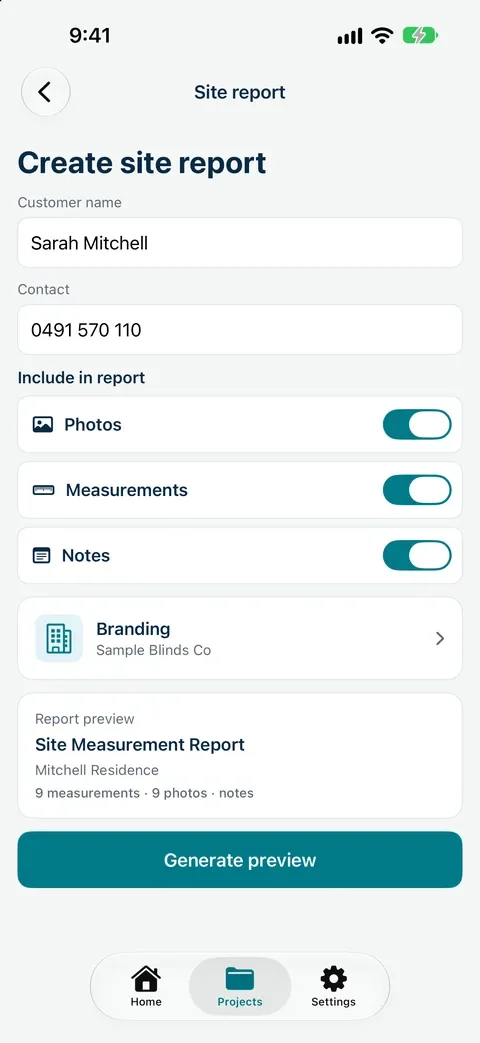
A branded site measurement report from Measure Genie carries your logo and business details, the customer and site, and one Measurements table with every size, the room it belongs to, where it came from and whether it was checked. Photos with dimension lines and your notes follow. Share the PDF by email or message. On iPhone you can choose whether photos, measurements and notes go in and preview it first. The report doesn't include prices. Send your quote from your usual quoting system.

Create site report on iPhone with customer name and contact, Photos, Measurements and Notes switched on, Wavelle Blinds & Shutters branding, a report preview for the Mitchell Residence and the Generate preview button
Create site report on iPhone

Why sending a report first helps

  • The customer can check the room list and product choices before the price lands.
  • Your quote is built from labelled sizes, not handwriting.
  • The same record goes to the workroom or installer when the job is accepted, and the check measure starts from it.

Measure for your quote, then send the report

Measure Genie records sizes, photos and notes by room and turns them into a branded report. Prepare the price in the system you already use.

Download Measure Genie on the App Store
Google Play

Fitting out a team? Talk to us about setup

Create site report on iPhone with customer name and contact, Photos, Measurements and Notes switched on, Wavelle Blinds & Shutters branding, a report preview for the Mitchell Residence and the Generate preview button

Frequently asked
questions

What happens at a measure and quote visit?

The installer or consultant measures each opening, discusses products and notes anything that affects the fit, then prepares a quote.

Does Measure Genie create quotes?

No. It records and reports measurements, photos and notes. Use the report to prepare your quote in the system you already use.

Can I use AR estimates for a quote?

For pricing, yes, if they stay marked as estimates. Measure every size with a tape before ordering.

How soon should I send the measure report?

Before you leave site, or as soon as possible. Measure Genie shares the PDF from your phone.

What is the difference between a measure and quote and a check measure?

A measure and quote prices the job. A check measure confirms the sizes before ordering.